
文章目录
认证:验证⽤户的合法身份,⽐如输⼊⽤户名和密码,系统会在后台验证⽤户名和密码是否合法,合法的前提下,才能够进⾏后续的操作,访问受保护的资源
微服务架构下统⼀认证场景
分布式系统的每个服务都会有认证需求,如果每个服务都实现⼀套认证逻辑会非常冗余,考虑分布式系统共享性的特点,需要由独⽴的认证服务处理系统认证的请求。
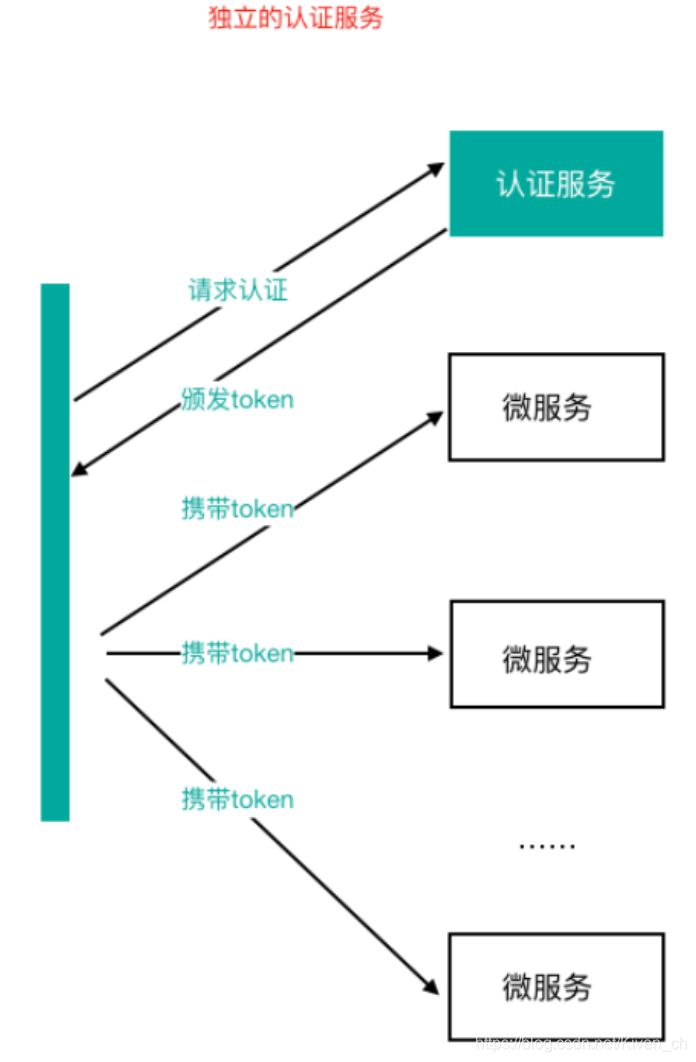
微服务架构下统⼀认证思路
-
基于Session的认证⽅式
在分布式的环境下,基于session的认证会出现⼀个问题,每个应⽤服务都需要在session中存储⽤户身份信息,通过负载均衡将本地的请求分配到另⼀个应⽤服务需要将session信息带过去,否则会重新认证。我们可以使⽤Session共享、Session黏贴等⽅案。
Session⽅案也有缺点,⽐如基于cookie,移动端不能有效使⽤等 -
基于token的认证⽅式
基于token的认证⽅式,服务端不⽤存储认证数据,易维护扩展性强, 客户端可以把token 存在任意地⽅,并且可以实现web和app统⼀认证机制。其缺点也很明显,token由于⾃包含信息,因此⼀般数据量较大,而且每次请求 都需要传递,因此⽐较占带宽。另外,token的签名验签操作也会给cpu带来额外的处理负担。
OAuth2开放授权协议/标准
OAuth2介绍
OAuth(开放授权)是⼀个开放协议/标准,允许⽤户授权第三⽅应⽤访问他们存储在另外的服务提供者上的信息,⽽不需要将⽤户名和密码提供给第三⽅应⽤或分享他们数据的所有内容。
** 允许用户授权第三方应用访问他们存储在另外的服务提供者上的信息,而不需要将用户名和密码提供给第三方应用或分享他们数据的所有内容**
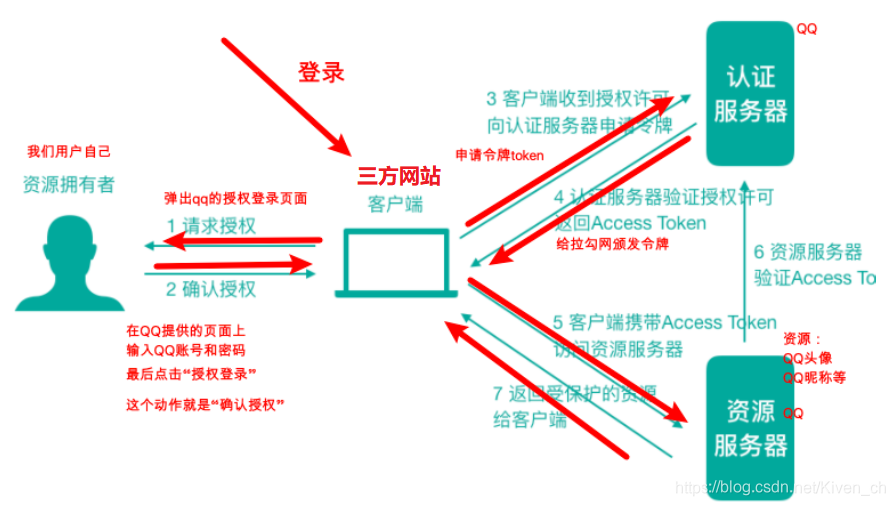
结合"使⽤QQ登录网站"这个场景拆分理解上述那句话
⽤户:我们⾃⼰
第三⽅应⽤:需要访问的网站
另外的服务提供者:QQ
OAuth2是OAuth协议的延续版本,但不向后兼容OAuth1即完全废⽌了OAuth1。
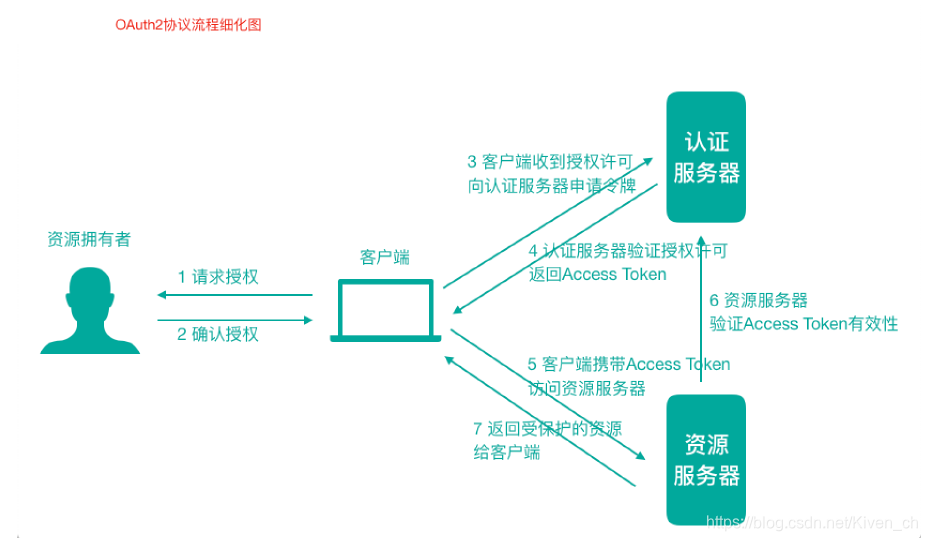
OAuth2协议角色和流程
网站要开发使⽤QQ登录这个功能的话,那么这个网站是需要提前到QQ平台进⾏登记的(否则QQ凭什么陪着玩授权登录这件事)
1)第三方网站------登记------>QQ平台
2)QQ 平台会颁发⼀些参数给网站,后续上线进⾏授权登录的时候(打开授权⻚⾯)需要携带这些参数
client_id :客户端id(QQ最终相当于⼀个认证授权服务器,第三方网站就相当于⼀个客户端了,所以会给⼀个客户端id),相当于账号
secret:相当于密码
-
资源所有者(Resource Owner):可以理解为⽤户⾃⼰
-
客户端(Client):我们想登陆的⽹站或应⽤
-
认证服务器(Authorization Server):可以理解为微信或者QQ
-
资源服务器(Resource Server):可以理解为微信或者QQ
什么情况下需要使用OAuth2?
第三⽅授权登录的场景:⽐如,我们经常登录⼀些⽹站或者应⽤的时候,可以选择使⽤第三⽅授权登录的⽅式,⽐如:微信授权登录、QQ授权登录、微博授权登录等,这是典型的 OAuth2 使⽤场景。
单点登录的场景:如果项⽬中有很多微服务或者公司内部有很多服务,可以专⻔做⼀个认证中⼼(充当认证平台⻆⾊),所有的服务都要到这个认证中⼼做认证,做⼀次登录,就可以在多个授权范围内的服务中⾃由串⾏。
OAuth2的颁发Token授权⽅式
-
授权码(authorization-code)
-
密码式(password)提供⽤户名+密码换取token令牌
-
隐藏式(implicit)
-
客户端凭证(client credentials)
授权码模式使⽤到了回调地址,是最复杂的授权⽅式,微博、微信、QQ等第三⽅登录就是这种模式。我们重点讲解接⼝对接中常使⽤的password密码模式(提供⽤户名+密码换取token)。
Spring Cloud OAuth2 + JWT 实现
Spring Cloud OAuth2介绍
Spring Cloud OAuth2 是 Spring Cloud 体系对OAuth2协议的实现,可以⽤来做多个微服务的统⼀认证(验证身份合法性)授权(验证权限)。通过向OAuth2服务(统⼀认证授权服务)发送某个类型的grant_type进⾏集中认证和授权,从⽽获得access_token(访问令牌),⽽这个token是受其他微服务信任的。
注意:使用OAuth2解决问题的本质是,引入了一个认证授权层,认证授权层连接了资源的拥有者,在授权层里面,资源的拥有者可以给第三方应用授权去访问我们的某些受保护资源。
Spring Cloud OAuth2构建微服务统一认证服务思路
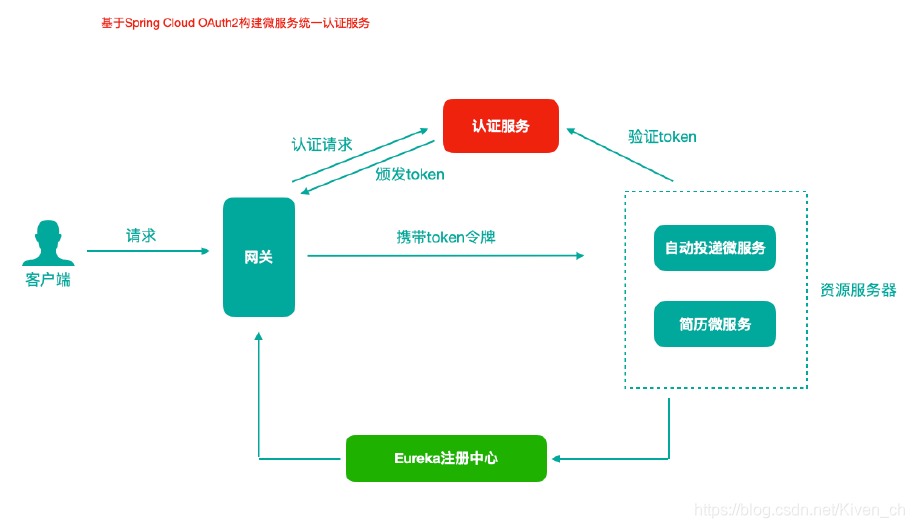
注意:在我们统一认证的场景中,Resource Server其实就是我们的各种受保护的微服务,微服务中的各种API访问接口就是资源,发起http请求的浏览器就是Client客户端(对应为第三方应用)
搭建认证服务器(Authorization Server)
认证服务器(Authorization Server),负责颁发token
继续使用之前文章中的工程
- 新建module
cloud-oauth-server-9999 - 修改pom文件添加依赖
    <dependencies>
        <dependency>
            <groupId>org.springframework.cloud</groupId>
            <artifactId>spring-cloud-starter-netflix-eureka-client</artifactId>
        </dependency>

       <dependency>
            <groupId>org.springframework.cloud</groupId>
            <artifactId>spring-cloud-starter-oauth2</artifactId>
            <exclusions>
                <exclusion>
                    <groupId>org.springframework.security.oauth.boot</groupId>
                    <artifactId>spring-security-oauth2-autoconfigure</artifactId>
                </exclusion>
            </exclusions>
        </dependency>
        <!-- https://mvnrepository.com/artifact/org.springframework.security.oauth.boot/spring-security-oauth2-autoconfigure -->
        <dependency>
            <groupId>org.springframework.security.oauth.boot</groupId>
            <artifactId>spring-security-oauth2-autoconfigure</artifactId>
            <version>2.3.4.RELEASE</version>
        </dependency>
        <dependency>
            <groupId>org.springframework.security.oauth</groupId>
            <artifactId>spring-security-oauth2</artifactId>
            <version>2.3.4.RELEASE</version>
        </dependency>

    </dependencies>
- 修改yaml文件
server:
  port: 9999
spring:
  application:
    name: cloud-oauth-server
eureka:
  client:
    service-url:
      defaultZone: http://eureka8762.com:8762/eureka/,http://eureka8761.com:8761/eureka/ #把 eureka 集群中的所有 url 都填写了进来,也可以只写一台,因为各个 eureka server 可以同步注册表
  instance:
    #使用ip注册,否则会使用主机名注册了(此处考虑到对老版本的兼容,新版本经过实验都是ip)
    prefer-ip-address: true
    #自定义实例显示格式,加上版本号,便于多版本管理,注意是ip-address,早期版本是ipAddress
    instance-id: ${
   spring.cloud.client.ip-address}:${
   spring.application.name}:${
   server.port}:@project.version@
- 主启动类
@SpringBootApplication
@EnableDiscoveryClient
public class OauthServer9999 {

    public static void main(String[] args) {

        SpringApplication.run(OauthServer9999.class, args);
    }
}
- 认证服务器配置类
import org.springframework.beans.factory.annotation.Autowired;
import org.springframework.context.annotation.Configuration;
import org.springframework.http.HttpMethod;
import org.springframework.security.authentication.AuthenticationManager;
import org.springframework.security.crypto.password.PasswordEncoder;
import org.springframework.security.oauth2.config.annotation.configurers.ClientDetailsServiceConfigurer;
import org.springframework.security.oauth2.config.annotation.web.configuration.AuthorizationServerConfigurerAdapter;
import org.springframework.security.oauth2.config.annotation.web.configuration.EnableAuthorizationServer;
import org.springframework.security.oauth2.config.annotation.web.configuration.EnableOAuth2Client;
import org.springframework.security.oauth2.config.annotation.web.configurers.AuthorizationServerEndpointsConfigurer;
import org.springframework.security.oauth2.config.annotation.web.configurers.AuthorizationServerSecurityConfigurer;
import org.springframework.security.oauth2.provider.token.AuthorizationServerTokenServices;
import org.springframework.security.oauth2.provider.token.DefaultTokenServices;
import org.springframework.security.oauth2.provider.token.TokenStore;
import org.springframework.security.oauth2.provider.token.store.InMemoryTokenStore;

@Configuration
@EnableAuthorizationServer
public class OauthServerConfig extends AuthorizationServerConfigurerAdapter {


    @Autowired
    public AuthenticationManager authenticationManager;

    @Override
    public void configure(AuthorizationServerSecurityConfigurer security) throws Exception {

        super.configure(security);
        // 相当于打开endpoints 访问接口的开关,这样的话后期我们能够访问该接口
        security.allowFormAuthenticationForClients()                 // 允许客户端表单认证
                .tokenKeyAccess("permitAll()")                 // 开启端口/oauth/token_key的访问权限(允许)
                .checkTokenAccess("permitAll()"); // 开启端口/oauth/check_token的访问权限(允许)
    }

    /**
     * 客户端详情配置,
     *  比如client_id,secret
     *  当前这个服务就如同QQ平台,拉勾网作为客户端需要qq平台进行登录授权认证等,提前需要到QQ平台注册,QQ平台会给拉勾网
     *  颁发client_id等必要参数,表明客户端是谁
     * @param clients
     * @throws Exception
     */
    @Override
    public void configure(ClientDetailsServiceConfigurer clients) throws Exception {

        super.configure(clients);
        // 从内存中加载客户端详情
        clients.inMemory()// 客户端信息存储在什么地方,可以在内存中,可以在数据库里
                .withClient("cloud_client") // 添加一个client配置,指定其client_id
                .secret("abcdef") // 指定客户端的密码/安全码
                .resourceIds("autodeliver") // 指定客户端所能访问资源id清单,此处的资源id是需要在具体的资源服务器上也配置一样
                // 认证类型/令牌颁发模式,可以配置多个在这里,但是不一定都用,具体使用哪种方式颁发token,需要客户端调用的时候传递参数指定
                .authorizedGrantTypes("password", "refresh_token")
                // 客户端的权限范围,此处配置为all全部即可
                .scopes("all");
    }

    /**
     *        该方法用于创建tokenStore对象(令牌存储对象)
     *         token以什么形式存储
     * @return
     */
    public TokenStore tokenStore() {

        return new InMemoryTokenStore();
    }

    public AuthorizationServerTokenServices authorizationServerTokenServices() {

        // 使用默认实现
        DefaultTokenServices defaultTokenServices = new DefaultTokenServices();
        defaultTokenServices.setSupportRefreshToken(true); // 是否开启令牌刷新
        defaultTokenServices.setTokenStore(tokenStore());

        // 设置令牌有效时间(一般设置为2个小时)
        defaultTokenServices.setAccessTokenValiditySeconds(20); // access_token就是我们请求资源需要携带的令牌
        // 设置刷新令牌的有效时间
        defaultTokenServices.setRefreshTokenValiditySeconds(60*60*24); // 24小时
        return defaultTokenServices;
    }

    /**
     * 认证服务器是玩转token的,那么这里配置token令牌管理相关(token此时就是一个字符串,当下的token需要在服务器端存储,
     * 那么存储在哪里呢?都是在这里配置)
     * @param endpoints
     * @throws Exception
     */
    @Override
    public void configure(AuthorizationServerEndpointsConfigurer endpoints) throws Exception {

        super.configure(endpoints);
        endpoints.tokenStore(tokenStore())
                .tokenServices(authorizationServerTokenServices())
                .authenticationManager(authenticationManager)
                .allowedTokenEndpointRequestMethods(HttpMethod.GET, HttpMethod.POST);
    }
}
-
关于三个configure⽅法
-
configure(ClientDetailsServiceConfigurer clients)
⽤来配置客户端详情服务(ClientDetailsService),客户端详情信息在 这⾥进⾏初始化,你能够把客户端详情信息写死在这⾥或者是通过数据库来存储调取详情信息 -
configure(AuthorizationServerEndpointsConfigurer endpoints)
⽤来配置令牌(token)的访问端点和令牌服务(token services) -
configure(AuthorizationServerSecurityConfigureroauthServer)
⽤来配置令牌端点的安全约束.
-
-
关于 TokenStore
-
InMemoryTokenStore
默认采⽤,它可以完美的⼯作在单服务器上(即访问并发量 压⼒不⼤的情况下,并且它在失败的时候不会进⾏备份),⼤多数的项⽬都可以使⽤这个版本的实现来进⾏ 尝试,你可以在开发的时候使⽤它来进⾏管理,因为不会被保存到磁盘中,所以更易于调试。 -
JdbcTokenStore
这是⼀个基于JDBC的实现版本,令牌会被保存进关系型数据库。使⽤这个版本的实现时, 你可以在不同的服务器之间共享令牌信息,使⽤这个版本的时候请注意把"spring-jdbc"这个依赖加⼊到你的 classpath当中。 -
JwtTokenStore
这个版本的全称是 JSON Web Token(JWT),它可以把令牌相关的数据进⾏编码(因此对于后端服务来说,它不需要进⾏存储,这将是⼀个重⼤优势),缺点就是这个令牌占⽤的空间会⽐较⼤,如果你加⼊了⽐较多⽤户凭证信息,JwtTokenStore 不会保存任何数据。
-
import com.fasterxml.jackson.databind.introspect.AnnotationCollector;
import org.springframework.beans.factory.annotation.Autowired;
import org.springframework.context.annotation.Bean;
import org.springframework.context.annotation.Configuration;
import org.springframework.security.authentication.AuthenticationManager;
import org.springframework.security.config.annotation.authentication.builders.AuthenticationManagerBuilder;
import org.springframework.security.config.annotation.web.configuration.WebSecurityConfigurerAdapter;
import org.springframework.security.core.userdetails.User;
import org.springframework.security.core.userdetails.UserDetails;
import org.springframework.security.crypto.password.DelegatingPasswordEncoder;
import org.springframework.security.crypto.password.NoOpPasswordEncoder;
import org.springframework.security.crypto.password.PasswordEncoder;

import java.util.ArrayList;


@Configuration
public class SecurityConfig extends WebSecurityConfigurerAdapter {

   @Autowired
   PasswordEncoder passwordEncoder;

   /**
    * 注册一个认证管理器对象到容器
    */
   @Override
   @Bean
   public AuthenticationManager authenticationManagerBean() throws Exception {

       return super.authenticationManagerBean();
   }

   @Bean
   public PasswordEncoder passwordEncoder() {

       return NoOpPasswordEncoder.getInstance();
   }

   /**
    * 处理用户名和密码验证事宜
    * 1)客户端传递username和password参数到认证服务器
    * 2)一般来说,username和password会存储在数据库中的用户表中
    * 3)根据用户表中数据,验证当前传递过来的用户信息的合法性
    */
   @Override
   protected void configure(AuthenticationManagerBuilder auth) throws Exception {

       // super.configure(auth);
       UserDetails user = new User("admin", "123456", new ArrayList<>());
       auth.inMemoryAuthentication()
               .withUser(user).passwordEncoder(passwordEncoder);
   }
}
-
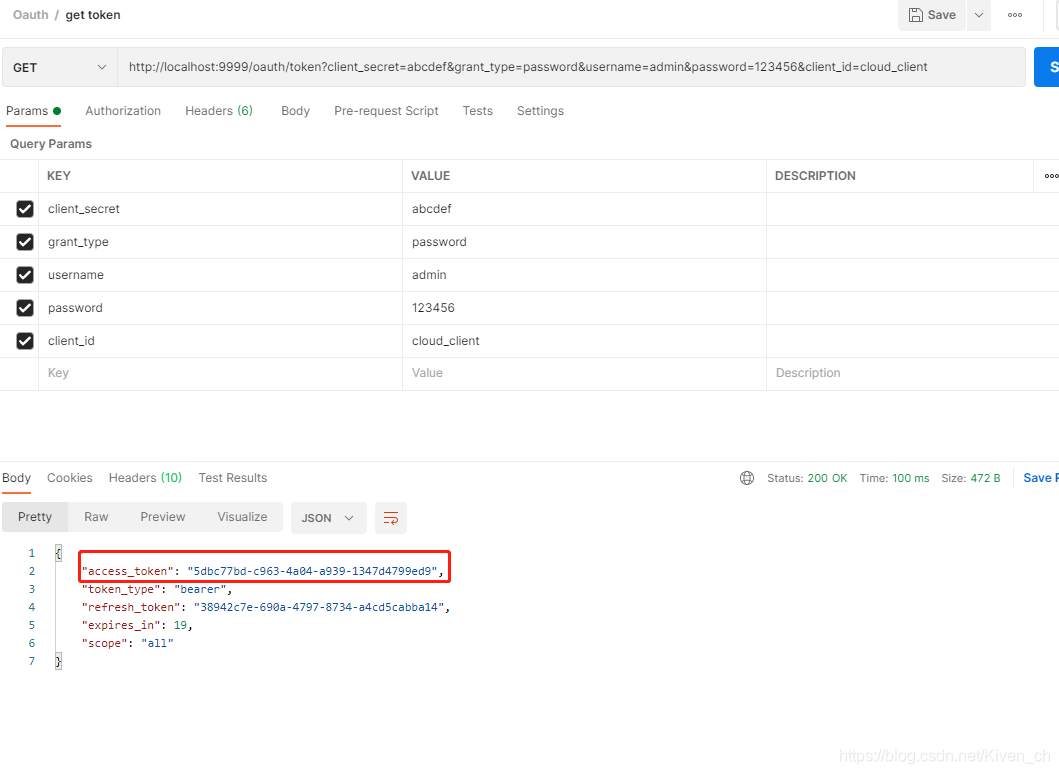
endpoint:/oauth/token
-
获取token携带的参数
-
client_id:客户端id
-
client_secret:客户单密码
-
grant_type:指定使⽤哪种颁发类型,password
-
username:⽤户名
-
password:密码
-
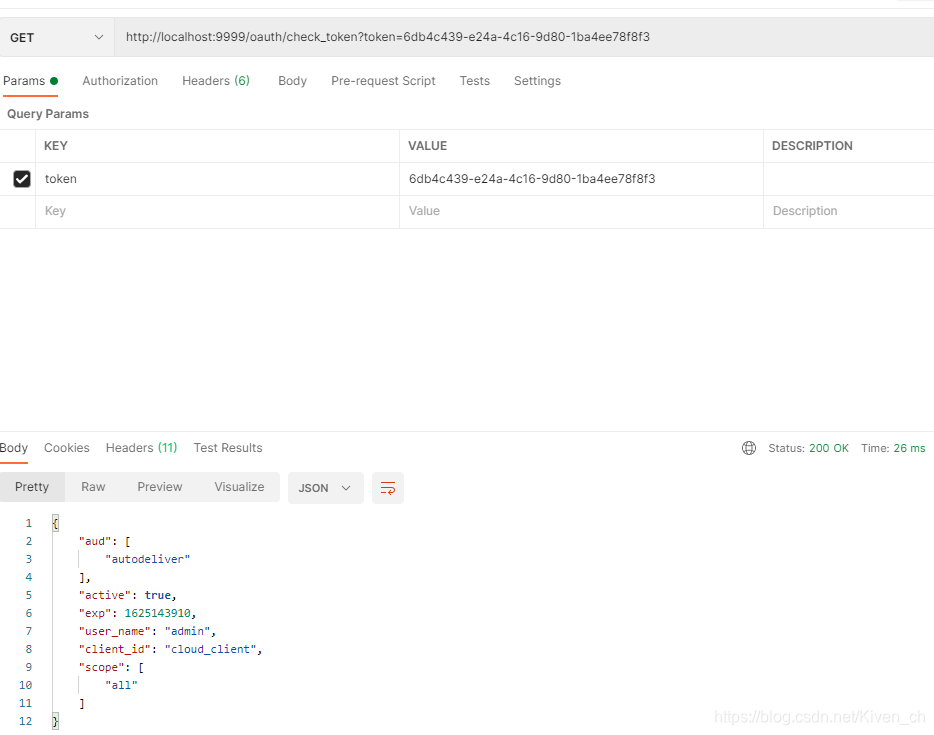
校验token:
http://localhost:9999/oauth/check_token?token=6db4c439-e24a-4c16-9d80-1ba4ee78f8f3
刷新token:
http://localhost:9999/oauth/token?grant_type=refresh_token&client_secret=abcdef&client_id=cloud_client&refresh_token=38942c7e-690a-4797-8734-a4cd5cabba14
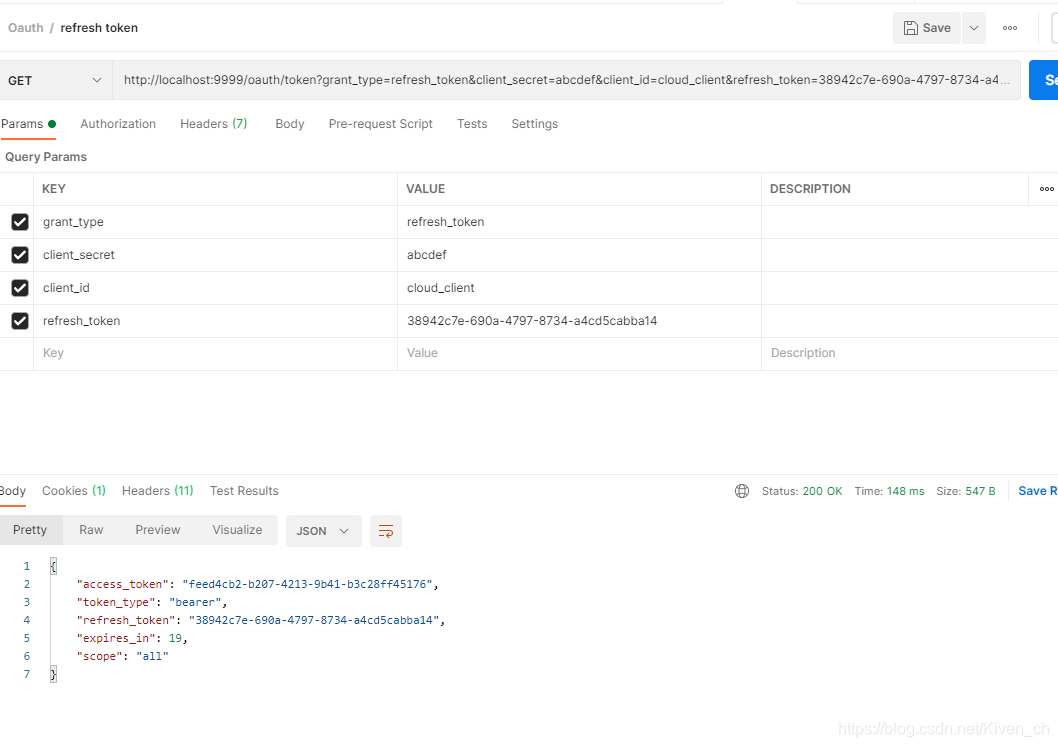
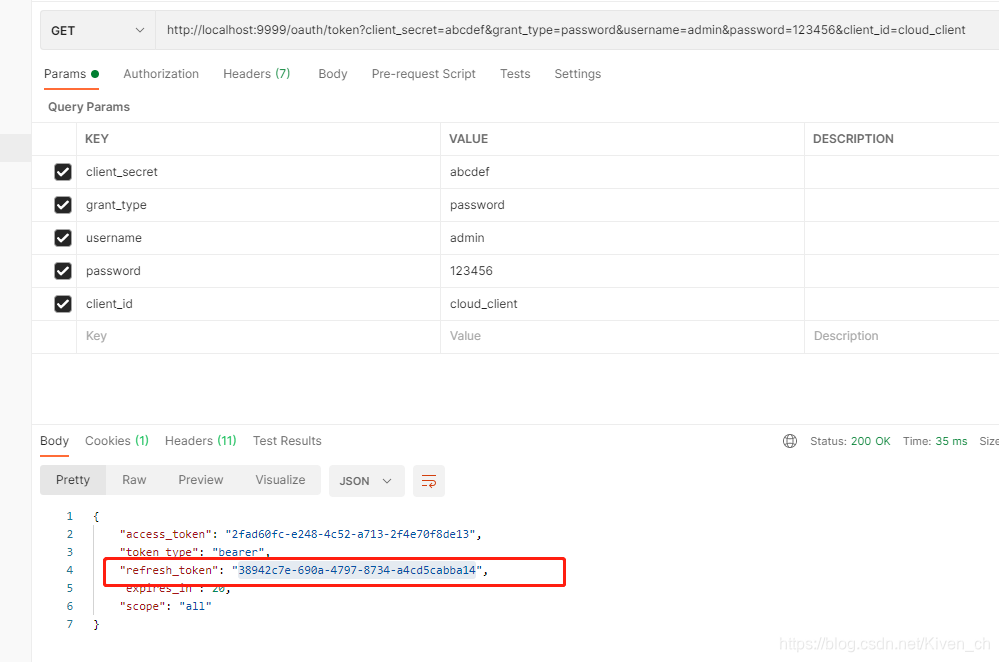
注意上面的请求中的refresh_token参数,是获取token中返回的
搭建资源服务器
在原有的cloud-service-autodeliver-8092工程操作
- 添加pom依赖
        <!--导入spring cloud oauth2依赖-->
        <dependency>
            <groupId>org.springframework.cloud</groupId>
            <artifactId>spring-cloud-starter-oauth2</artifactId>
            <exclusions>
                <exclusion>
                    <groupId>org.springframework.security.oauth.boot</groupId>
                    <artifactId>spring-security-oauth2-autoconfigure</artifactId>
                </exclusion>
            </exclusions>
        </dependency>
        <dependency>
            <groupId>org.springframework.security.oauth.boot</groupId>
            <artifactId>spring-security-oauth2-autoconfigure</artifactId>
            <version>2.1.11.RELEASE</version>
        </dependency>
        <!--引入security对oauth2的支持-->
        <dependency>
            <groupId>org.springframework.security.oauth</groupId>
            <artifactId>spring-security-oauth2</artifactId>
            <version>2.3.4.RELEASE</version>
        </dependency>
- 资源服务配置类
import org.apache.tomcat.util.http.parser.Authorization;
import org.springframework.context.annotation.Configuration;
import org.springframework.security.config.annotation.web.builders.HttpSecurity;
import org.springframework.security.config.annotation.web.configuration.EnableWebSecurity;
import org.springframework.security.config.http.SessionCreationPolicy;
import org.springframework.security.oauth2.config.annotation.web.configuration.EnableResourceServer;
import org.springframework.security.oauth2.config.annotation.web.configuration.ResourceServerConfigurerAdapter;
import org.springframework.security.oauth2.config.annotation.web.configurers.ResourceServerSecurityConfigurer;
import org.springframework.security.oauth2.provider.token.RemoteTokenServices;

@Configuration
@EnableResourceServer
@EnableWebSecurity
public class ResourceServerConfig extends ResourceServerConfigurerAdapter {


    /**
     * 该方法用于定义资源服务器向远程认证服务器发起请求,进行token校验等事宜
     * @param resources
     * @throws Exception
     */
    @Override
    public void configure(ResourceServerSecurityConfigurer resources) throws Exception {

        // 设置当前资源服务的资源id
        resources.resourceId("autodeliver");
        // 定义token服务对象(token校验就应该靠token服务对象)
        RemoteTokenServices remoteTokenServices = new RemoteTokenServices();
        // 校验端点/接口设置
        remoteTokenServices.setCheckTokenEndpointUrl("http://localhost:9999/oauth/check_token");
        // 携带客户端id和客户端安全码
        remoteTokenServices.setClientId("cloud_client");
        remoteTokenServices.setClientSecret("abcdef");

        resources.tokenServices(remoteTokenServices);
    }

    /**
     * 场景:一个服务中可能有很多资源(API接口)
     *    某一些API接口,需要先认证,才能访问
     *    某一些API接口,压根就不需要认证,本来就是对外开放的接口
     *    我们就需要对不同特点的接口区分对待(在当前configure方法中完成),设置是否需要经过认证
     * @param http
     * @throws Exception
     */
    @Override
    public void configure(HttpSecurity http) throws Exception {

        http.sessionManagement().sessionCreationPolicy(SessionCreationPolicy.IF_REQUIRED)// 设置session的创建策略(根据需要创建即可)
                .and()
                .authorizeRequests()
                .antMatchers("/autodeliver/**").authenticated() // autodeliver为前缀的请求需要认证
                .antMatchers("/demo/**").authenticated() // demo为前缀的请求需要认证
                .anyRequest().permitAll(); //  其他请求不认证
    }
}
- 测试
-
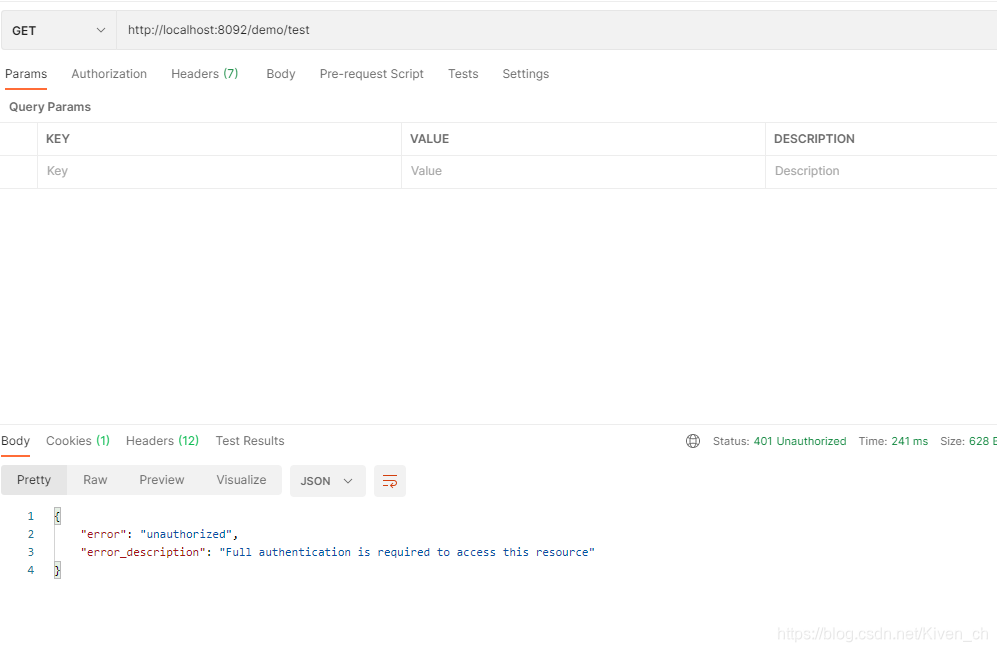
不添加token访问
http://localhost:8092/demo/test
-
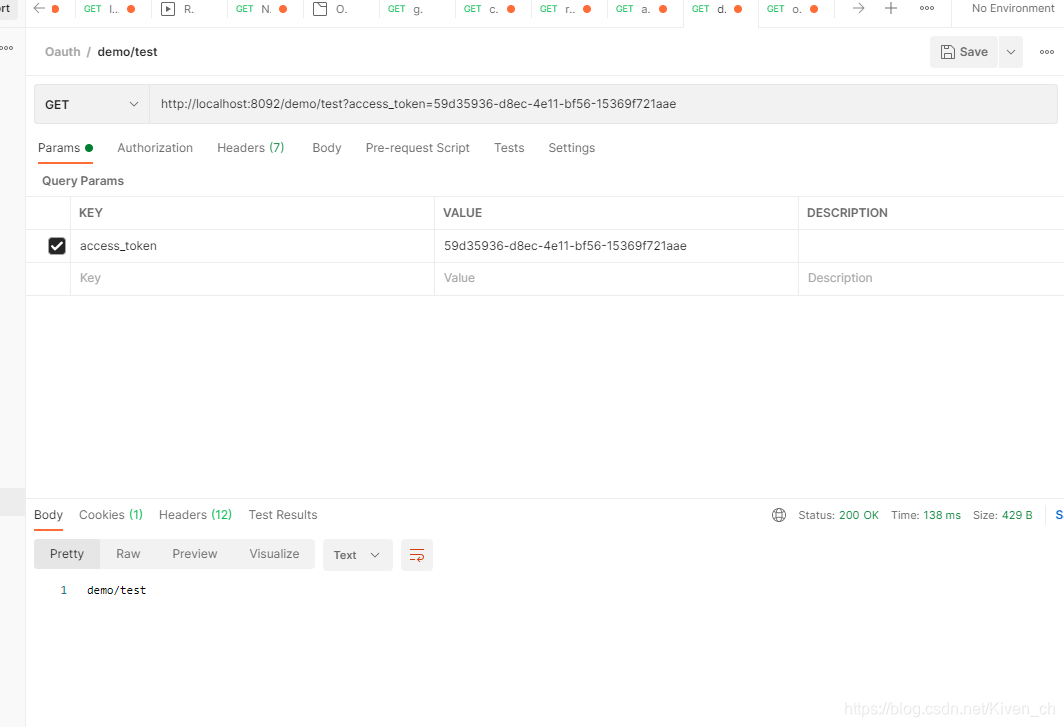
添加token后访问
http://localhost:8092/demo/test?access_token=59d35936-d8ec-4e11-bf56-15369f721aae
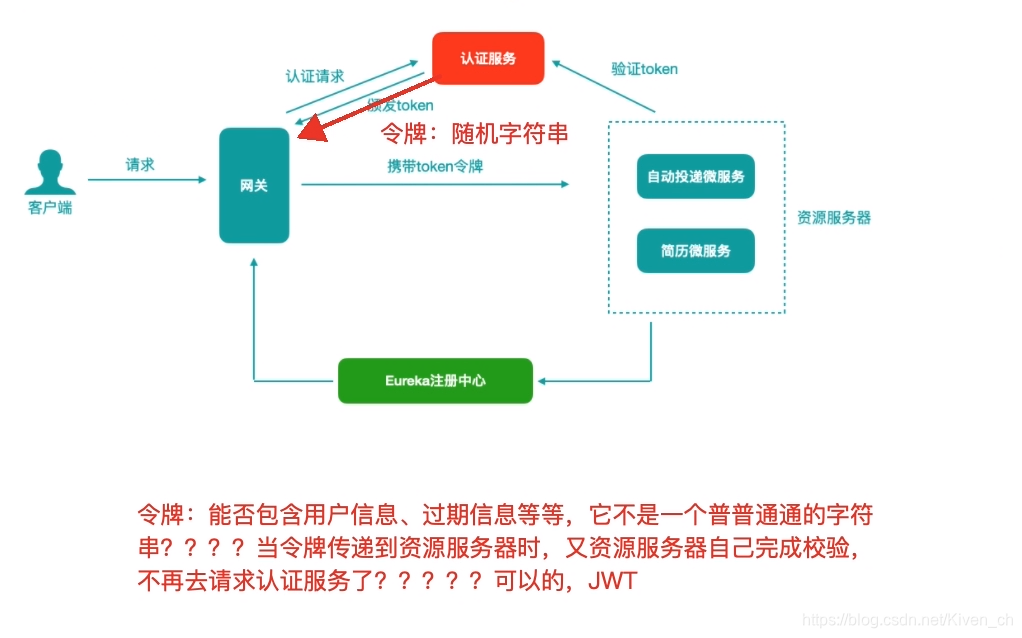
当我们第⼀次登陆之后,认证服务器颁发token并将其存储在认证服务器中,后期我们访问资源服务器时会携带token,资源服务器会请求认证服务器验证token有效性,如果资源服务器有很多,那么认证服务器压⼒会很⼤...
另外,资源服务器向认证服务器check_token,获取的也是⽤户信息UserInfo,能否把⽤户信息存储到令牌中,让客户端⼀直持有这个令牌,令牌的验证也在资源服务器进⾏,这样避免和认证服务器频繁的交互...
JWT改造统一认证授权中心的令牌存储机制
JWT令牌介绍
通过上边的测试我们发现,当资源服务和授权服务不在⼀起时资源服务使⽤RemoteTokenServices 远程请求授权 服务验证token,如果访问量较⼤将会影响系统的性能。
解决上边问题: 令牌采⽤JWT格式即可解决上边的问题,⽤户认证通过会得到⼀个JWT令牌,JWT令牌中已经包括了⽤户相关的信 息,客户端只需要携带JWT访问资源服务,资源服务根据事先约定的算法⾃⾏完成令牌校验,⽆需每次都请求认证 服务完成授权。
-
什么是JWT?
JSON Web Token(JWT)是⼀个开放的⾏业标准(RFC 7519),它定义了⼀种简介的、⾃包含的协议格式,⽤于 在通信双⽅传递json对象,传递的信息经过数字签名可以被验证和信任。JWT可以使⽤HMAC算法或使⽤RSA的公 钥/私钥对来签名,防⽌被篡改。 -
JWT令牌结构
JWT令牌由三部分组成,每部分中间使⽤点(.)分隔,⽐如:xxxxx.yyyyy.zzzzz
- Header
头部包括令牌的类型(即JWT)及使⽤的哈希算法(如HMAC SHA256或RSA),例如
{

	"alg": "HS256",
	"typ": "JWT"
}
将上边的内容使⽤Base64Url编码,得到⼀个字符串就是JWT令牌的第⼀部分。
- Payload
第⼆部分是负载,内容也是⼀个json对象,它是存放有效信息的地⽅,它可以存放jwt提供的现成字段,⽐ 如:iss(签发者),exp(过期时间戳), sub(⾯向的⽤户)等,也可⾃定义字段。 此部分不建议存放敏感信息,因为此部分可以解码还原原始内容。 最后将第⼆部分负载使⽤Base64Url编码,得到⼀个字符串就是JWT令牌的第⼆部分。 ⼀个例⼦:
{

	"sub": "1234567890",
	"name": "John Doe",
	"iat": 1516239022
}
-
Signature
第三部分是签名,此部分⽤于防⽌jwt内容被篡改。 这个部分使⽤base64url将前两部分进⾏编码,编码后使⽤点(.)连接组成字符串,最后使⽤header中声明 签名算法进⾏签名。HMACSHA256(
base64UrlEncode(header) + "." +
base64UrlEncode(payload),
secret)
base64UrlEncode(header):jwt令牌的第⼀部分。
base64UrlEncode(payload):jwt令牌的第⼆部分。
secret:签名所使⽤的密钥。
认证服务器端JWT改造(改造主配置类)
   /**
    *        该方法用于创建tokenStore对象(令牌存储对象)
    *         token以什么形式存储
    * @return
    */
   public TokenStore tokenStore() {

       // return new InMemoryTokenStore();
       return new JwtTokenStore(jwtAccessTokenConverter());
   }

   private String signingKey = "cloud123";

   public JwtAccessTokenConverter jwtAccessTokenConverter () {

       JwtAccessTokenConverter jwtAccessTokenConverter = new JwtAccessTokenConverter();
       jwtAccessTokenConverter.setSigningKey(signingKey);
       jwtAccessTokenConverter.setVerifier(new MacSigner(signingKey));
       return jwtAccessTokenConverter;
   }

   public AuthorizationServerTokenServices authorizationServerTokenServices() {

       // 使用默认实现
       DefaultTokenServices defaultTokenServices = new DefaultTokenServices();
       defaultTokenServices.setSupportRefreshToken(true); // 是否开启令牌刷新
       defaultTokenServices.setTokenStore(tokenStore());
       // 针对jwt令牌的添加
       defaultTokenServices.setTokenEnhancer(jwtAccessTokenConverter());
       // 设置令牌有效时间(一般设置为2个小时)
       defaultTokenServices.setAccessTokenValiditySeconds(20); // access_token就是我们请求资源需要携带的令牌
       // 设置刷新令牌的有效时间
       defaultTokenServices.setRefreshTokenValiditySeconds(60*60*24); // 24小时
       return defaultTokenServices;
   }
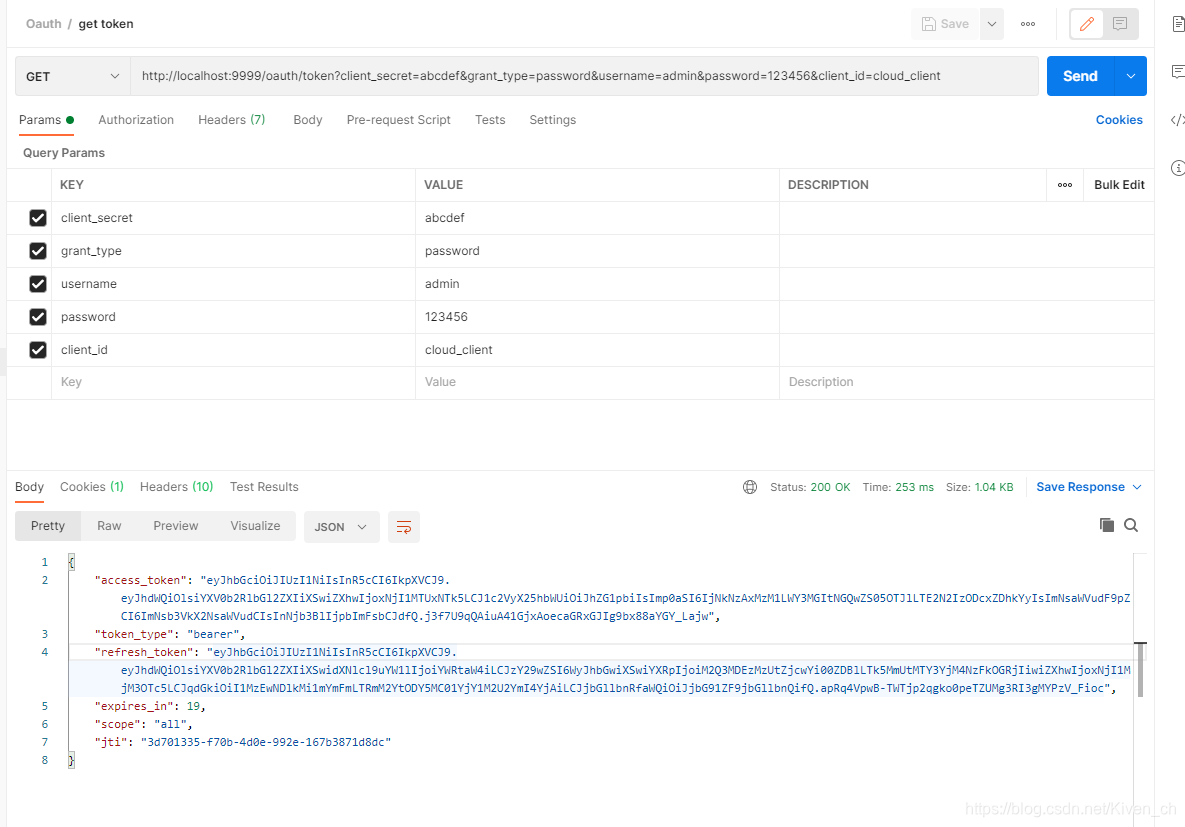
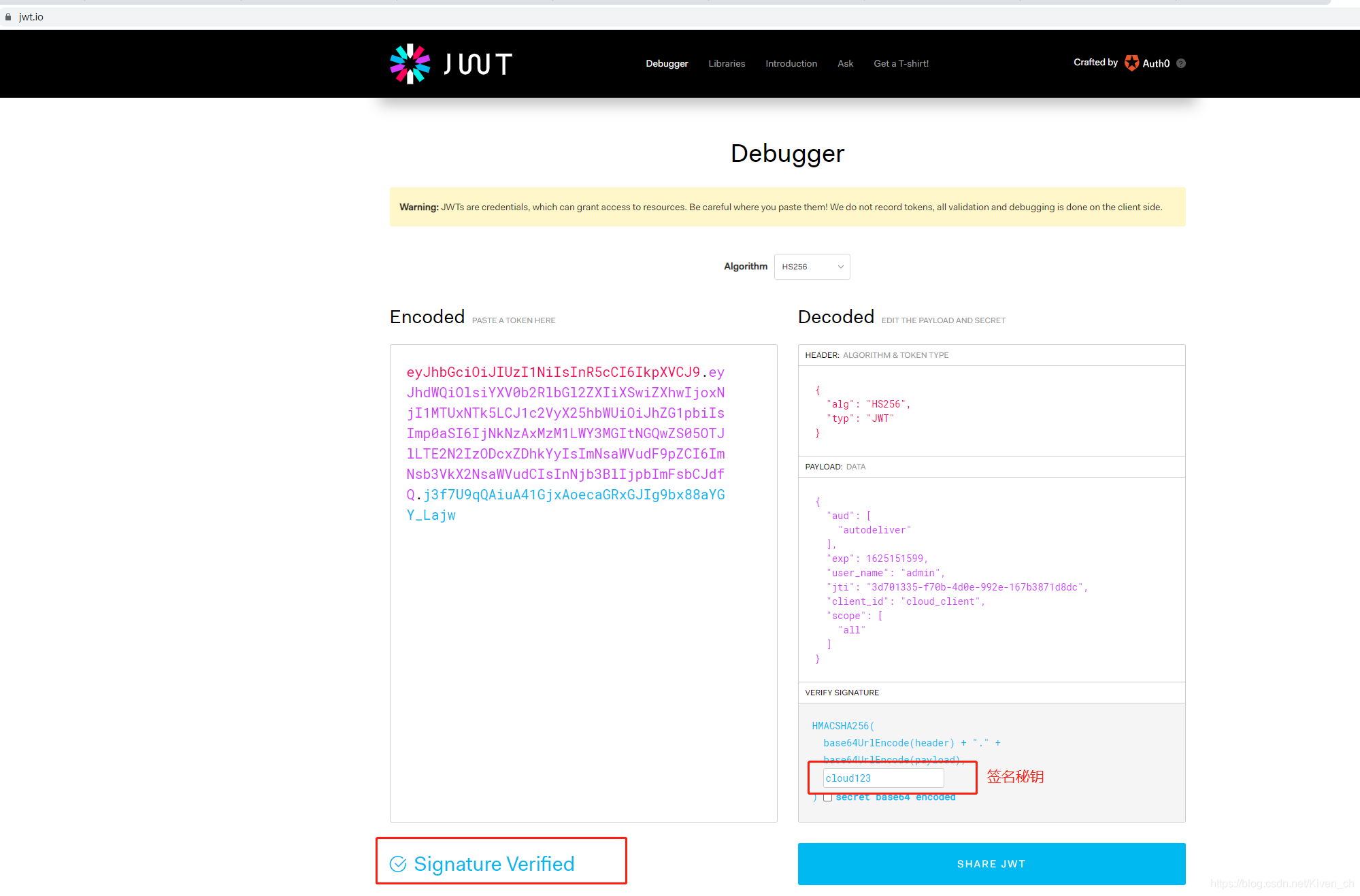
到jwt官网进行token验证
https://jwt.io/
资源服务器校验JWT令牌
不需要和远程认证服务器交互,添加本地tokenStore
    private String signingKey = "cloud123";

    public JwtAccessTokenConverter jwtAccessTokenConverter () {

        JwtAccessTokenConverter jwtAccessTokenConverter = new JwtAccessTokenConverter();
        jwtAccessTokenConverter.setSigningKey(signingKey);
        jwtAccessTokenConverter.setVerifier(new MacSigner(signingKey));
        return jwtAccessTokenConverter;
    }

    public TokenStore tokenStore (){

        return new JwtTokenStore(jwtAccessTokenConverter());
    }


    /**
     * 该方法用于定义资源服务器向远程认证服务器发起请求,进行token校验等事宜
     * @param resources
     * @throws Exception
     */
    @Override
    public void configure(ResourceServerSecurityConfigurer resources) throws Exception {

        // // 设置当前资源服务的资源id
        // resources.resourceId("autodeliver");
        // // 定义token服务对象(token校验就应该靠token服务对象)
        // RemoteTokenServices remoteTokenServices = new RemoteTokenServices();
        // // 校验端点/接口设置
        // remoteTokenServices.setCheckTokenEndpointUrl("http://localhost:9999/oauth/check_token");
        // // 携带客户端id和客户端安全码
        // remoteTokenServices.setClientId("cloud_client");
        // remoteTokenServices.setClientSecret("abcdef");
        //
        // resources.tokenServices(remoteTokenServices);

        resources.resourceId("autodeliver").tokenStore(tokenStore()).stateless(true);
    }
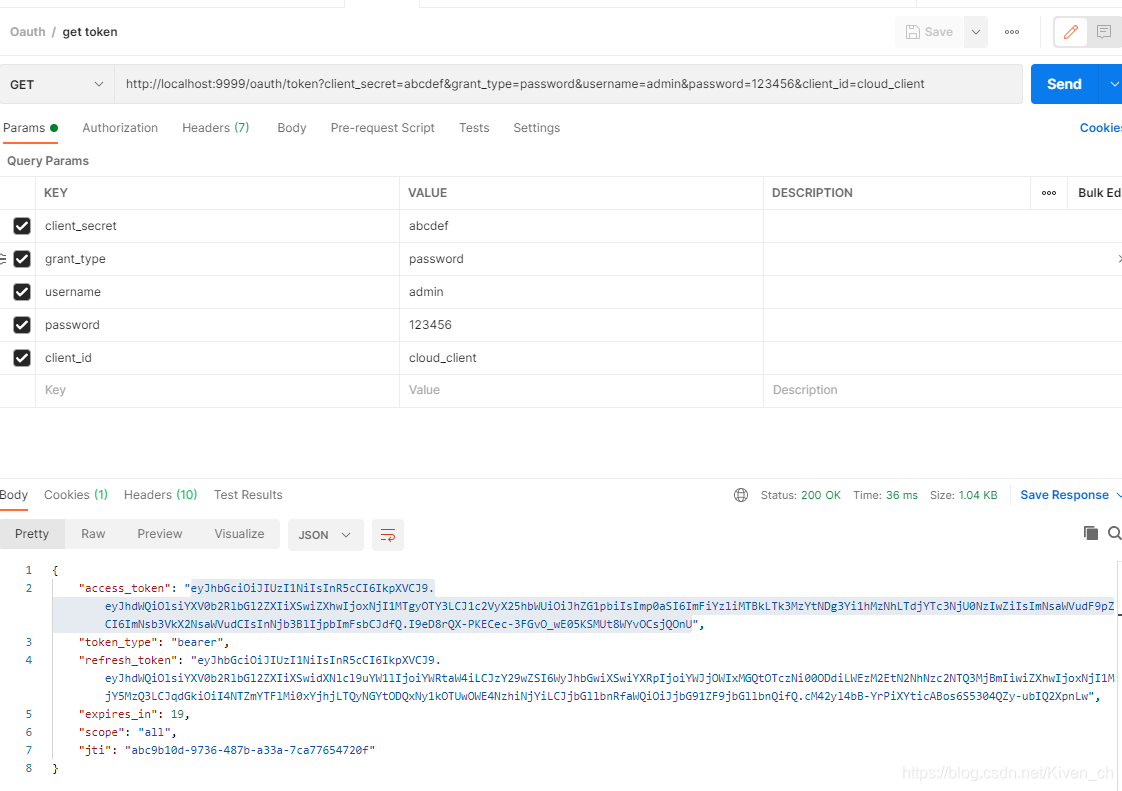
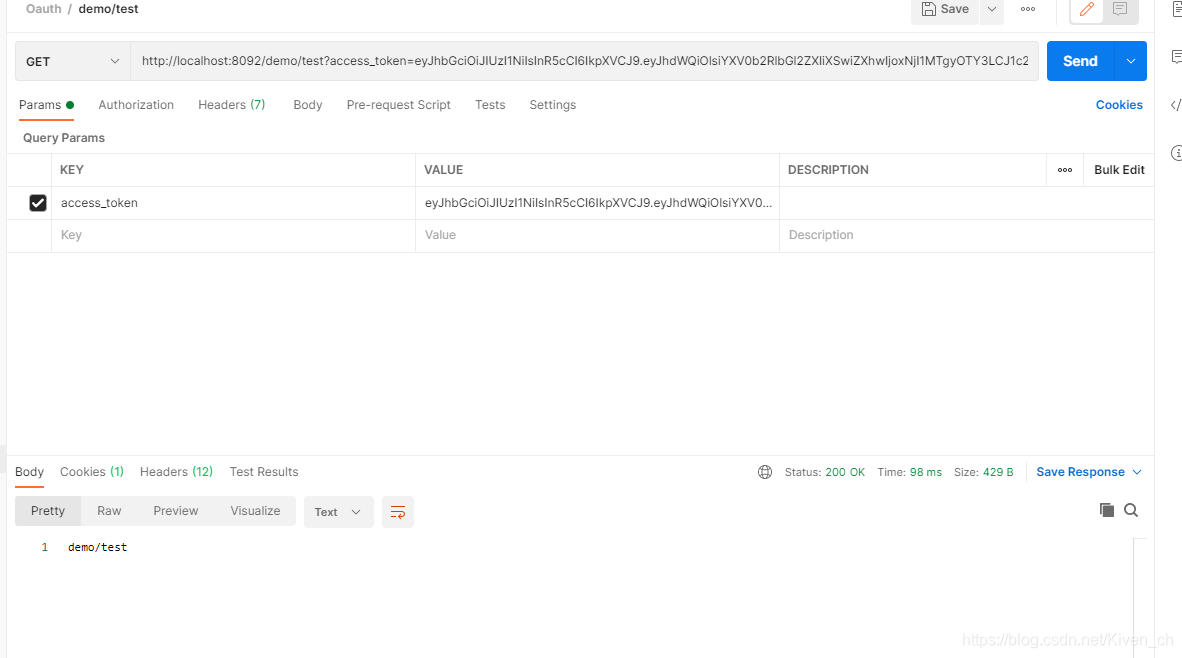
测试:
从数据库加载Oauth2客户端信息
- 引入pom依赖
        <dependency>
            <groupId>com.alibaba</groupId>
            <artifactId>druid-spring-boot-starter</artifactId>
            <version>1.2.5</version>
        </dependency>
        <dependency>
            <groupId>mysql</groupId>
            <artifactId>mysql-connector-java</artifactId>
        </dependency>
        <dependency>
            <groupId>org.springframework</groupId>
            <artifactId>spring-tx</artifactId>
        </dependency>

        <dependency>
            <groupId>org.mybatis.spring.boot</groupId>
            <artifactId>mybatis-spring-boot-starter</artifactId>
            <version>2.1.4</version>
        </dependency>
- 创建数据表并初始化数据(表名及字段保持固定)
drop database if exists oauth2;

create database oauth2;

use oauth2;

SET NAMES utf8mb4;
SET FOREIGN_KEY_CHECKS = 0;
-- ----------------------------
-- Table structure for oauth_client_details
-- ----------------------------
DROP TABLE IF EXISTS `oauth_client_details`;
CREATE TABLE `oauth_client_details`
(
    `client_id`               varchar(48) NOT NULL,
    `resource_ids`            varchar(256)  DEFAULT NULL,
    `client_secret`           varchar(256)  DEFAULT NULL,
    `scope`                   varchar(256)  DEFAULT NULL,
    `authorized_grant_types`  varchar(256)  DEFAULT NULL,
    `web_server_redirect_uri` varchar(256)  DEFAULT NULL,
    `authorities`             varchar(256)  DEFAULT NULL,
    `access_token_validity`   int(11)       DEFAULT NULL,
    `refresh_token_validity`  int(11)       DEFAULT NULL,
    `additional_information`  varchar(4096) DEFAULT NULL,
    `autoapprove`             varchar(256)  DEFAULT NULL,
    PRIMARY KEY (`client_id`)
) ENGINE = InnoDB
  DEFAULT CHARSET = utf8;
-- ----------------------------
-- Records of oauth_client_details
-- ----------------------------
BEGIN;
INSERT INTO `oauth_client_details`
VALUES ('cloud_client123',
        'autodeliver,resume', 'abcdef', 'all', 'password,refresh_token',
        NULL, NULL, 7200, 259200, NULL, NULL);
COMMIT;
SET FOREIGN_KEY_CHECKS = 1;

select * from oauth_client_details;
- 配置数据源
server:
  port: 9999
spring:
  application:
    name: cloud-oauth-server
  datasource:
    driver-class-name: com.mysql.jdbc.Driver
    url: jdbc:mysql://192.168.137.144:3306/oauth2?useUnicode=true&characterEncoding=utf-8&useSSL=false&allowMultiQueries=true
    username: root
    password: 123456
    type: com.alibaba.druid.pool.DruidDataSource

eureka:
  client:
    service-url:
      defaultZone: http://eureka8762.com:8762/eureka/,http://eureka8761.com:8761/eureka/ #把 eureka 集群中的所有 url 都填写了进来,也可以只写一台,因为各个 eureka server 可以同步注册表
  instance:
    #使用ip注册,否则会使用主机名注册了(此处考虑到对老版本的兼容,新版本经过实验都是ip)
    prefer-ip-address: true
    #自定义实例显示格式,加上版本号,便于多版本管理,注意是ip-address,早期版本是ipAddress
    instance-id: ${
   spring.cloud.client.ip-address}:${
   spring.application.name}:${
   server.port}:@project.version@
- 认证服务器主配置类改造
    @Autowired
    private DataSource dataSource;

    public JdbcClientDetailsService jdbcClientDetailsService() {

        return new JdbcClientDetailsService(dataSource);
    }

    /**
     * 客户端详情配置,
     *  比如client_id,secret
     *  当前这个服务就如同QQ平台,拉勾网作为客户端需要qq平台进行登录授权认证等,提前需要到QQ平台注册,QQ平台会给拉勾网
     *  颁发client_id等必要参数,表明客户端是谁
     * @param clients
     * @throws Exception
     */
    @Override
    public void configure(ClientDetailsServiceConfigurer clients) throws Exception {

        super.configure(clients);

        clients.withClientDetails(jdbcClientDetailsService());
    }
从数据库验证用户合法性
- 创建数据表users(表名不需固定),初始化数据
SET NAMES utf8mb4;
SET FOREIGN_KEY_CHECKS = 0;
-- ----------------------------
-- Table structure for users
-- ----------------------------
DROP TABLE IF EXISTS `users`;
CREATE TABLE `users`
(
    `id`       int(11) NOT NULL AUTO_INCREMENT,
    `username` char(10)  DEFAULT NULL,
    `password` char(100) DEFAULT NULL,
    PRIMARY KEY (`id`)
) ENGINE = InnoDB
  AUTO_INCREMENT = 5
  DEFAULT CHARSET = utf8;
-- ----------------------------
-- Records of users
-- ----------------------------
BEGIN;
INSERT INTO `users`
VALUES (4, 'cloud-user', 'qwertyu');
COMMIT;
SET FOREIGN_KEY_CHECKS = 1;
- 创建mapper接口
import com.elvis.pojo.Users;
import org.apache.ibatis.annotations.Mapper;
import org.apache.ibatis.annotations.Select;

/**
 * @author Elvis
 * @create 2021-07-02 8:17
 */
@Mapper
public interface UsersDao {


    @Select("select * from users where username = #{username}")
    Users findUserByUsername(String username);
}
- 开发UserDetailsService接⼝的实现类,根据⽤户名从数据库加载⽤户信息
import com.elvis.dao.UsersDao;
import com.elvis.pojo.Users;
import org.springframework.beans.factory.annotation.Autowired;
import org.springframework.security.core.userdetails.User;
import org.springframework.security.core.userdetails.UserDetails;
import org.springframework.security.core.userdetails.UserDetailsService;
import org.springframework.security.core.userdetails.UsernameNotFoundException;
import org.springframework.stereotype.Service;

import java.util.ArrayList;

/**
 * @program: lagou-parent
 * @Description
 * @author Elvis
 * @date 2021-07-02 19:21
 */
@Service
public class JdbcUserDetailService implements UserDetailsService {


    @Autowired
    UsersDao usersDao;

    @Override
    public UserDetails loadUserByUsername(String username) throws UsernameNotFoundException {

        Users user = usersDao.findUserByUsername(username);
        return new User(user.getUsername(), user.getPassword(), new ArrayList<>());
    }
}
- 使⽤⾃定义的⽤户详情服务对象
import com.elvis.service.JdbcUserDetailService;
import com.fasterxml.jackson.databind.introspect.AnnotationCollector;
import org.springframework.beans.factory.annotation.Autowired;
import org.springframework.context.annotation.Bean;
import org.springframework.context.annotation.Configuration;
import org.springframework.security.authentication.AuthenticationManager;
import org.springframework.security.config.annotation.authentication.builders.AuthenticationManagerBuilder;
import org.springframework.security.config.annotation.web.configuration.WebSecurityConfigurerAdapter;
import org.springframework.security.core.userdetails.User;
import org.springframework.security.core.userdetails.UserDetails;
import org.springframework.security.crypto.password.DelegatingPasswordEncoder;
import org.springframework.security.crypto.password.NoOpPasswordEncoder;
import org.springframework.security.crypto.password.PasswordEncoder;
import org.springframework.security.oauth2.provider.client.JdbcClientDetailsService;

import java.util.ArrayList;

/**
 * @program: lagou-parent
 * @Description
 * @author Elvis
 * @date 2021-07-01 20:23
 */
@Configuration
public class SecurityConfig extends WebSecurityConfigurerAdapter {

    @Autowired
    PasswordEncoder passwordEncoder;

    @Autowired
    JdbcUserDetailService jdbcUserDetailService;

    /**
     * 注册一个认证管理器对象到容器
     */
    @Override
    @Bean
    public AuthenticationManager authenticationManagerBean() throws Exception {

        return super.authenticationManagerBean();
    }

    @Bean
    public PasswordEncoder passwordEncoder() {

        return NoOpPasswordEncoder.getInstance();
    }

    /**
     * 处理用户名和密码验证事宜
     * 1)客户端传递username和password参数到认证服务器
     * 2)一般来说,username和password会存储在数据库中的用户表中
     * 3)根据用户表中数据,验证当前传递过来的用户信息的合法性
     */
    @Override
    protected void configure(AuthenticationManagerBuilder auth) throws Exception {

        auth.userDetailsService(jdbcUserDetailService).passwordEncoder(passwordEncoder);
    }
}
- 测试
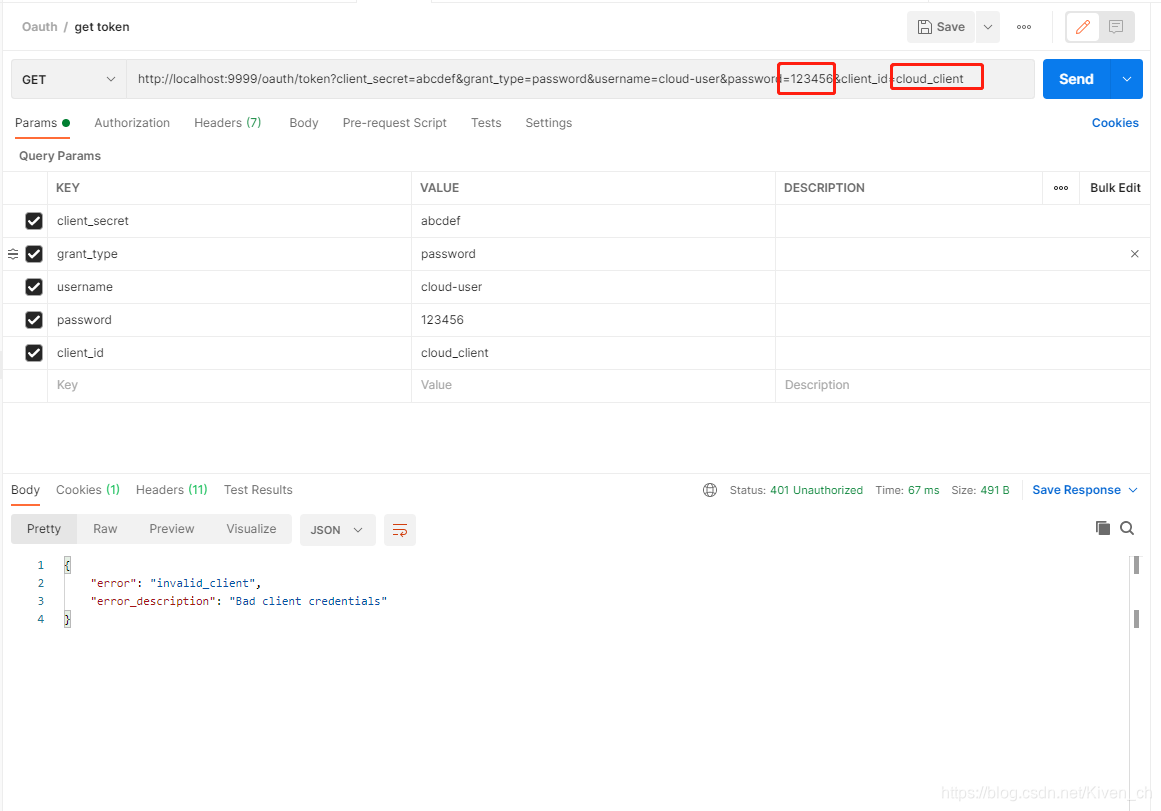
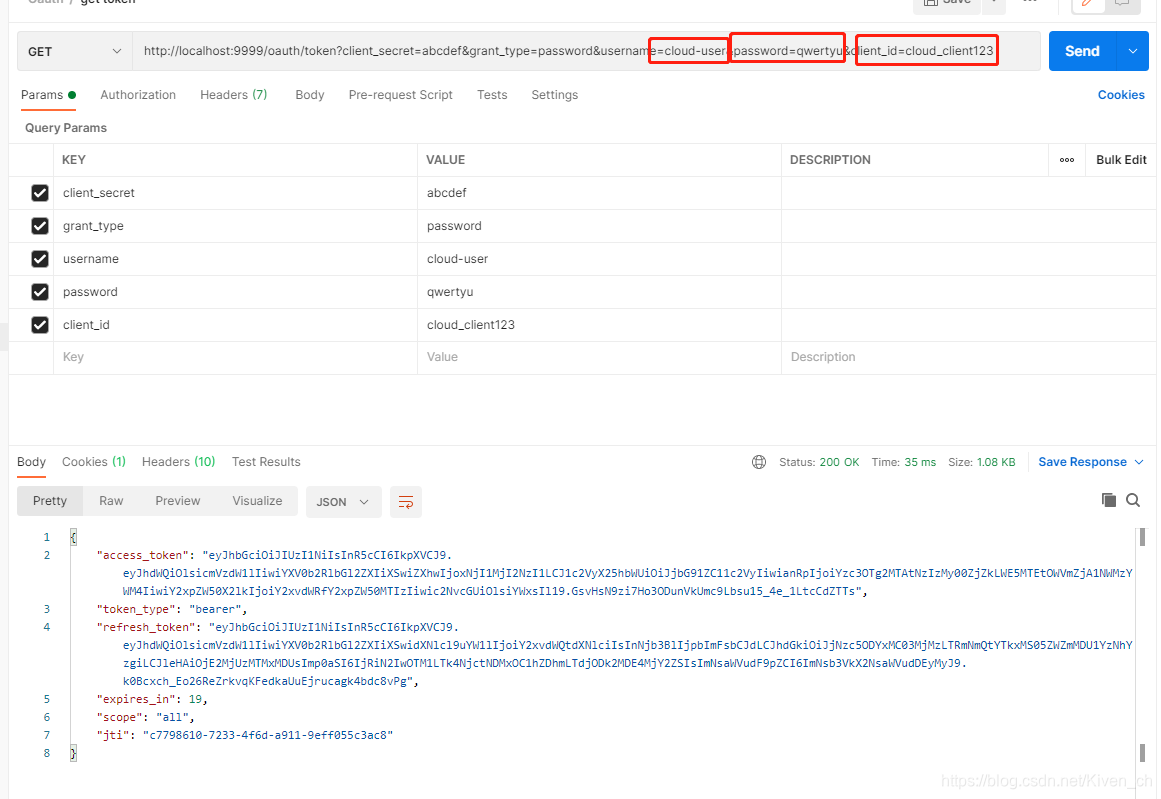
使用原来的用户名密码申请token会返回失败,需要使用保存到数据库的用户名密码才能申请到token
基于Oauth2的 JWT 令牌信息扩展
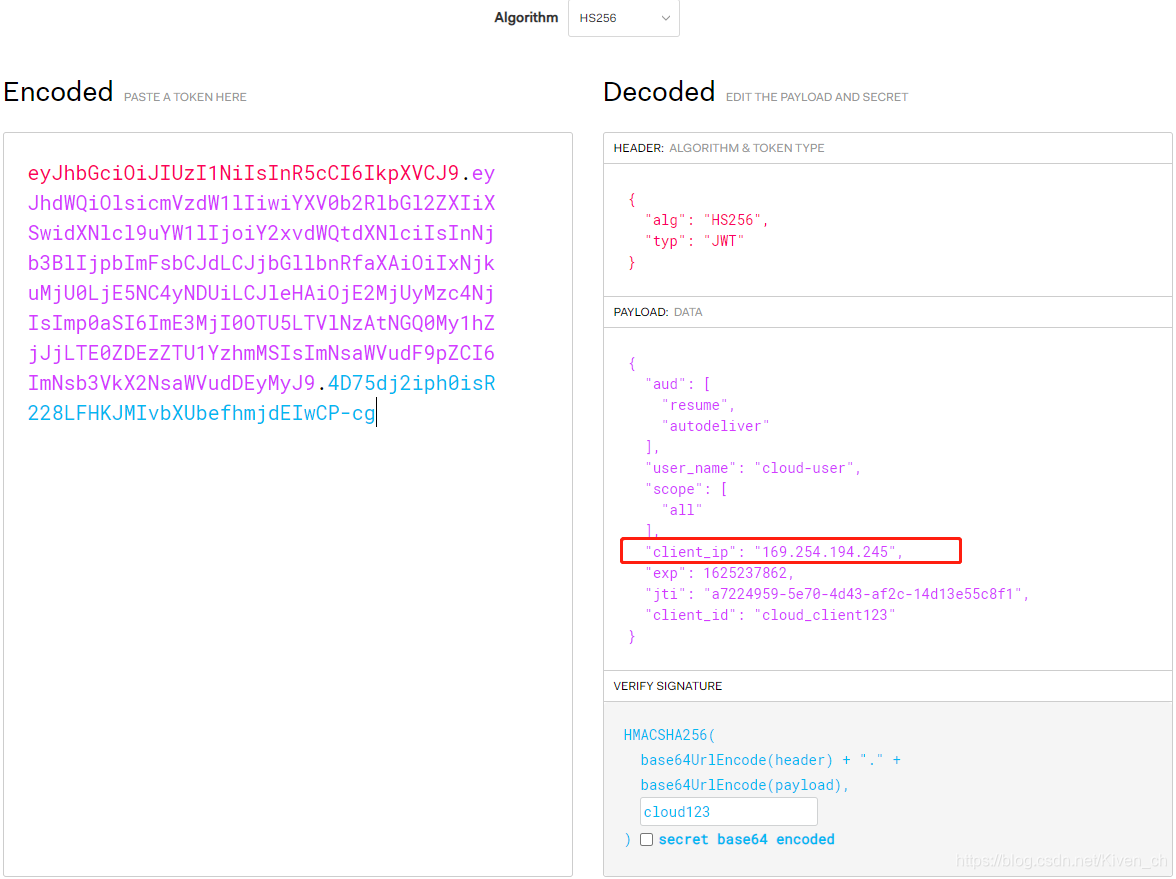
OAuth2帮我们⽣成的JWT令牌载荷部分信息有限,关于⽤户信息只有⼀个user_name,有些场景下我们希望放⼊⼀些扩展信息项,⽐如,之前我们经常向session中存⼊userId,或者现在我希望在JWT的载荷部分存⼊当时请求令牌的客户端IP,客户端携带令牌访问资源服务时,可以对⽐当前请求的客户端真实IP和令牌中存放的客户端IP是否匹配,不匹配拒绝请求,以此进⼀步提⾼安全性。那么如何在OAuth2环境下向JWT令牌中存如扩展信息?
- 认证服务器⽣成JWT令牌时存⼊扩展信息(⽐如clientIp)
继承DefaultAccessTokenConverter类,重写convertAccessToken⽅法存⼊扩展信息
import org.springframework.security.oauth2.common.OAuth2AccessToken;
import org.springframework.security.oauth2.provider.OAuth2Authentication;
import org.springframework.security.oauth2.provider.token.DefaultAccessTokenConverter;
import org.springframework.stereotype.Component;
import org.springframework.web.context.request.RequestContextHolder;
import org.springframework.web.context.request.ServletRequestAttributes;

import javax.servlet.ServletRequest;
import javax.servlet.http.HttpServletRequest;
import java.util.Map;

/**
 * @program: cloud-parent
 * @Description
 * @author Elvis
 * @date 2021-07-02 22:40
 */
@Component
public class CloudAccessTokenConverter extends DefaultAccessTokenConverter {

    @Override
    public Map<String, ?> convertAccessToken(OAuth2AccessToken token, OAuth2Authentication authentication) {

        HttpServletRequest request = ((ServletRequestAttributes) (RequestContextHolder.getRequestAttributes())).getRequest();
        String remoteAddr = request.getRemoteAddr();
        Map<String, String> stringMap = (Map<String, String>) super.convertAccessToken(token, authentication);
        stringMap.put("client_ip", remoteAddr);
        return stringMap;
    }
}
- 将⾃定义的转换器对象注⼊
    @Autowired
    private CloudAccessTokenConverter cloudAccessTokenConverter;

    public JwtAccessTokenConverter jwtAccessTokenConverter () {

        JwtAccessTokenConverter jwtAccessTokenConverter = new JwtAccessTokenConverter();
        jwtAccessTokenConverter.setSigningKey(signingKey);
        jwtAccessTokenConverter.setVerifier(new MacSigner(signingKey));
        jwtAccessTokenConverter.setAccessTokenConverter(cloudAccessTokenConverter);
        return jwtAccessTokenConverter;
    }
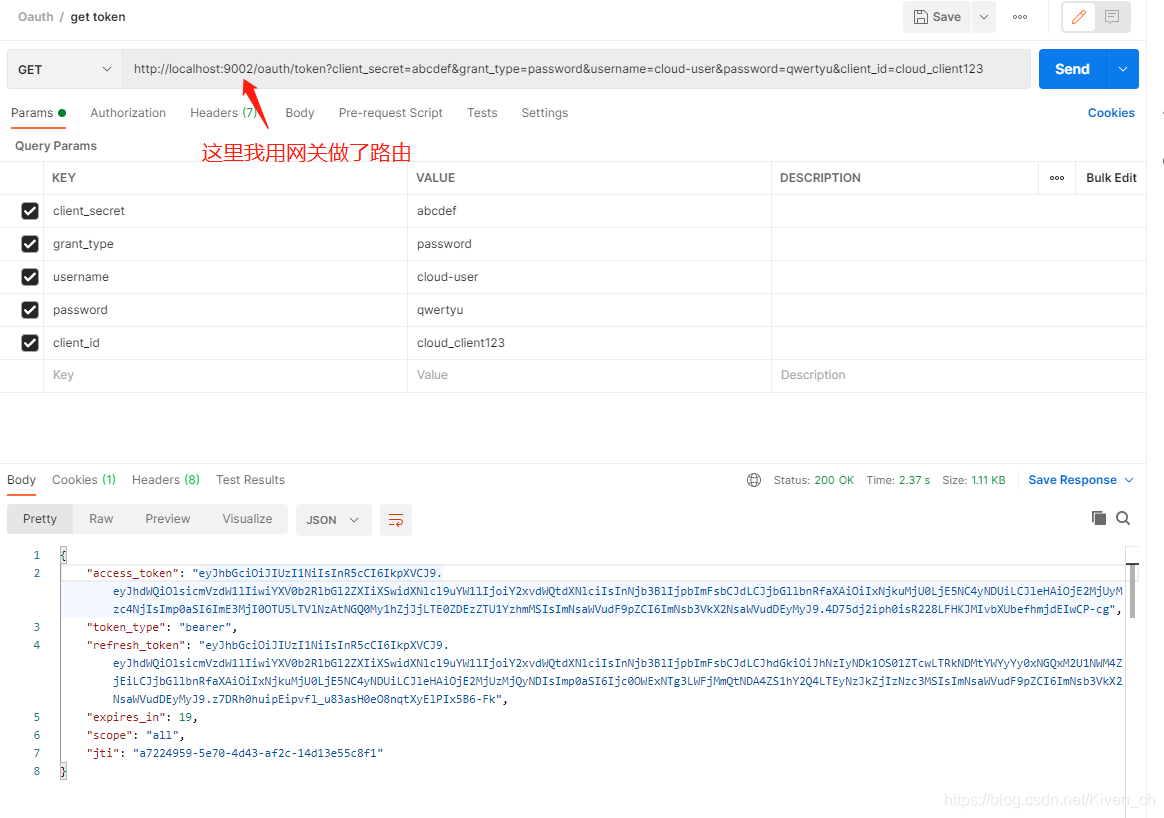
- 测试
资源服务器取出 JWT 令牌扩展信息
资源服务器也需要⾃定义⼀个转换器类,继承DefaultAccessTokenConverter,重写extractAuthentication提取⽅法,把载荷信息设置到认证对象的details属性中
import org.springframework.security.oauth2.common.OAuth2AccessToken;
import org.springframework.security.oauth2.provider.OAuth2Authentication;
import org.springframework.security.oauth2.provider.token.DefaultAccessTokenConverter;
import org.springframework.stereotype.Component;

import java.util.Map;

/**
 * @program: cloud-parent
 * @Description
 * @author Elvis
 * @date 2021-07-02 22:47
 */
@Component
public class CloudAccessTokenConverter extends DefaultAccessTokenConverter {


    @Override
    public OAuth2Authentication extractAuthentication(Map<String, ?> map) {

        OAuth2Authentication oAuth2Authentication = super.extractAuthentication(map);
        oAuth2Authentication.setDetails(map);  // 将map放入认证对象中,认证对象在controller中可以拿到
        return oAuth2Authentication;
    }
}
- 将⾃定义的转换器对象注⼊
    @Autowired
    private CloudAccessTokenConverter cloudAccessTokenConverter;

    public JwtAccessTokenConverter jwtAccessTokenConverter () {

        JwtAccessTokenConverter jwtAccessTokenConverter = new JwtAccessTokenConverter();
        jwtAccessTokenConverter.setSigningKey(signingKey);
        jwtAccessTokenConverter.setVerifier(new MacSigner(signingKey));
        jwtAccessTokenConverter.setAccessTokenConverter(cloudAccessTokenConverter);
        return jwtAccessTokenConverter;
    }
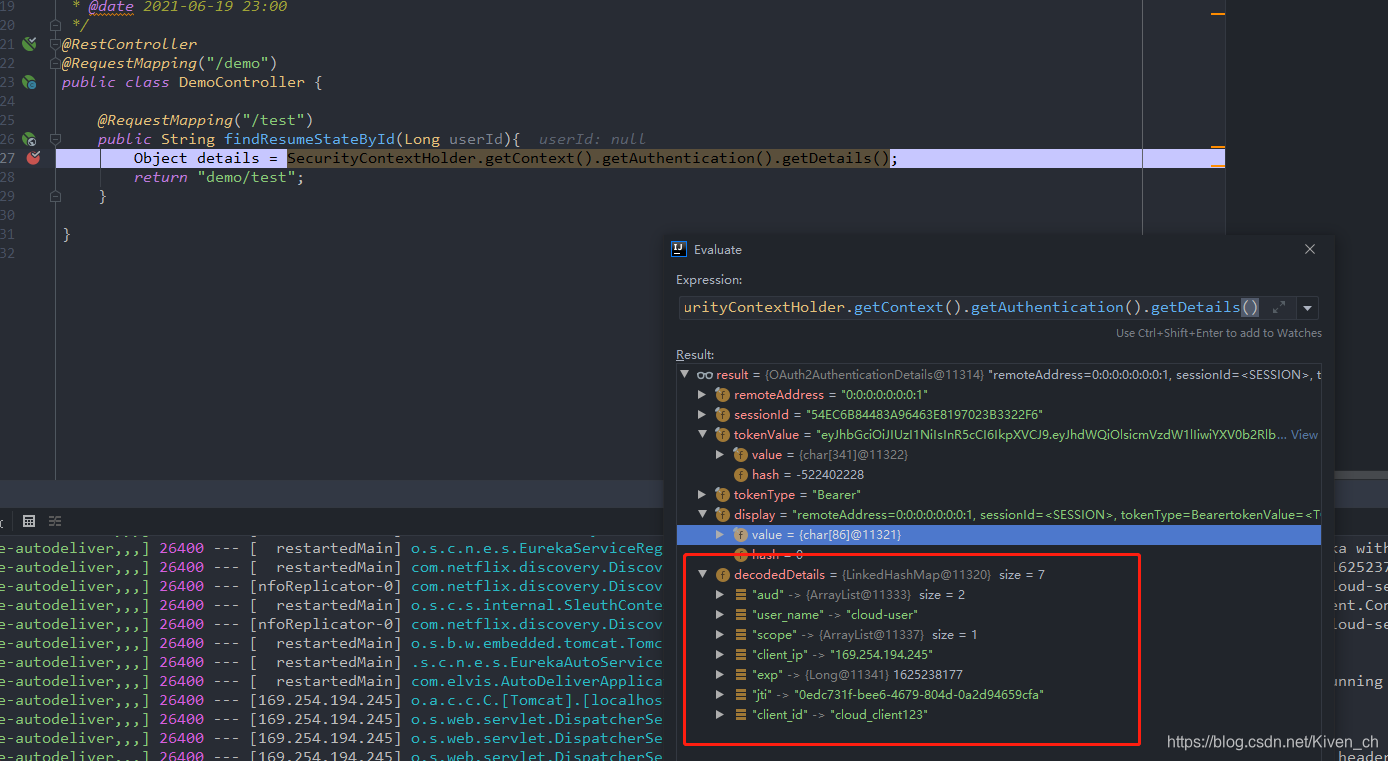
- 业务类⽐如Controller类中,可以通过
SecurityContextHolder.getContext().getAuthentication()获取到认证对象,进⼀步获取到扩展信息
@RestController
@RequestMapping("/demo")
public class DemoController {


    @RequestMapping("/test")
    public String findResumeStateById(Long userId){

        Object details = SecurityContextHolder.getContext().getAuthentication().getDetails();
        return "demo/test";
    }

}
获取到扩展信息后,就可以做其他的处理了,⽐如根据userId进⼀步处理,或者根据clientIp处理,或者其他都是可以的了
其他
关于JWT令牌我们需要注意
-
JWT令牌就是⼀种可以被验证的数据组织格式,它的玩法很灵活,我们这⾥是基于Spring Cloud Oauth2 创建、校验JWT令牌
我们也可以⾃⼰写⼯具类⽣成、校验JWT令牌 -
JWT令牌中不要存放过于敏感的信息,因为我们知道拿到令牌后,我们可以解码看到载荷部分的信息
-
JWT令牌每次请求都会携带,内容过多,会增加⽹络带宽占用
原文链接: https://blog.csdn.net/Kiven_ch/article/details/118367594