
手把手带你搞懂 Mybatis的多对一、一对多、动态SQL和缓存-CSDN社区
1、多对一处理
多对一:
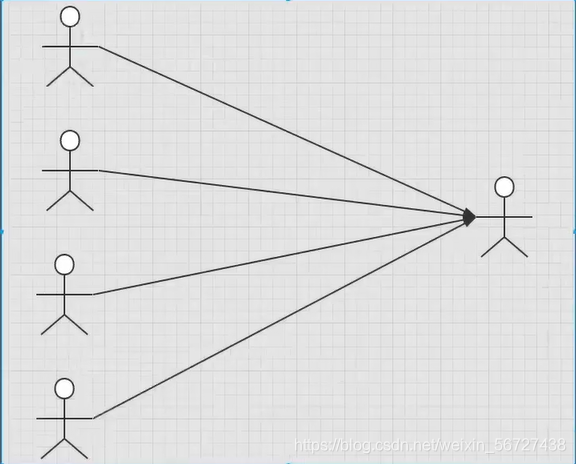
多个学生,对应一个老师
对于学生这边而言,关联.. 多个学生,关联一个老师【多对一】
对于老师这边而言,集合,一个老师有很多学生【一对多】
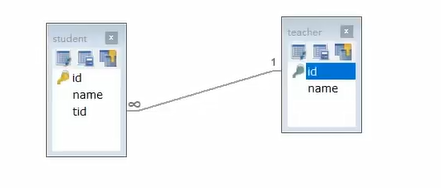
回顾Mysql多对一方式
子查询
联表查询
1.1、SQL 创建数据库
CREATE TABLE `teacher` (id INT(10) NOT NULL,
nameVARCHAR(30) DEFAULT NULL,PRIMARY KEY (`id`)
) ENGINE=INNODB DEFAULT CHARSET=utf8
INSERT INTO teacher(`id`,
name) VALUES (1, '秦老师');CREATE TABLE
student(idINT(10) NOT NULL,nameVARCHAR(30) DEFAULT NULL,tidINT(10) DEFAULT NULL,PRIMARY KEY (`id`),
KEY
fktid(`tid`),CONSTRAINT
fktidFOREIGN KEY (`tid`) REFERENCESteacher(`id`)) ENGINE=INNODB DEFAULT CHARSET=utf8
INSERT INTO
student(`id`,name,tid) VALUES ('1', '小明', '1');INSERT INTO
student(`id`,name,tid) VALUES ('2', '小红', '1');INSERT INTO
student(`id`,name,tid) VALUES ('3', '小张', '1');INSERT INTO
student(`id`,name,tid) VALUES ('4', '小李', '1');INSERT INTO
student(`id`,name,tid) VALUES ('5', '小王', '1');
1.2、环境搭建
导入lombok
新建实体类Teacher,Student
建立Mapper接口
建立Mapper.xml文件
在核心配置文件中绑定注册我们的Mapper接口或者文件!【方式很多,随心选】
测试查询是否成功
1.3、通过结果进行查询
<!-- 通过结果进行查询 --><select id="getStudent" resultMap="StudentTeacher">
select s.id as sid, s.name as sname,t.name as tname from student s, teacher t where s.tid=t.id
</select>
<resultMap id="StudentTeacher" type="Student">
<result property="id" column="sid"></result>
<result property="name" column="sname"/>
<association property="teacher" javaType="Teacher">
<result property="name" column="tname"/>
</association>
</resultMap>
1.4、按照查询嵌套
<!-- 按照查询嵌套--><select id="getStudent" resultMap="StudentTeacher">
select * from mybatis.student
</select>
<resultMap id="StudentTeacher" type="student">
<result property="id" column="id" />
<result property="name" column="name" />
<!-- 复杂属性: 对象:association 集合:collection -->
<association property="teacher" column="tid" javaType="Teacher" select="getTeacher"></association>
<!-- 注意这里是select 表示 子查询-->
</resultMap>
<select id="getTeacher" resultType="Teacher">
select * from mybatis.teacher where id=#{id}
</select>
2、一对多处理
比如:一个老师拥有多个学生
对于老师而言,一个老师拥有多个学生的关系
2.1、环境搭建
和刚才一样
编写相应的实体类
@Datapublic class Student {
private int id;
private String name;
private int tid;
}
@Datapublic class Teacher {
private int id;
private String name;
//一个老师 拥有多个学生
private List<Student> students;
}
2.2、按照结果嵌套处理
<!-- 按照结果查询 --><select id="getTeacher" resultMap="TeacherStudent">
select s.id sid,s.name sname,t.id tid, t.name tname
from student s , teacher t
where s.tid=t.id and t.id=#{tid}
</select>
<!-- 其实就是对sql语句的所获取的字段的映射 -->
<resultMap id="TeacherStudent" type="Teacher">
<result property="id" column="tid"/>
<result property="name" column="tname"/>
<!-- List 的类型获取 ofType="Studnet"
javaType = "" 指定属性的类型!
集合中的泛型信息,我们使用ofType获取
-->
<collection property="students" ofType="Student">
<result property="id" column="sid"/>
<result property="name" column="sname"/>
</collection>
</resultMap>
2.3、按照查询嵌套处理
<!--按照查询嵌套处理--><select id="getTeacher" resultMap="TeacherStudent">
select * from teacher where id = #{tid}
</select>
<resultMap id="TeacherStudent" type="Teacher">
<collection property="students" javaType="List" ofType="Student" select="getStudents" column="id" />
<!-----这里的id就是上面的sql语句和下面这个sql语句的关联点(以上面的为准)------->
</resultMap>
<select id="getStudents" resultType="student">
select * from mybatis.student where tid=#{id}
</select>
2.4、小结
关联 - association 【多对一】
集合 - collection【一对多】
JavaType & ofType
javaType 用来指定实体类中属性的类型
ofType 用来指定映射到List或者集合中的pojo类型,泛型中的约束类型
注意点:
保证SQL的可读性,尽量保证通俗易懂
注意一对多和多对一中,属性名和字段的问题
如果问题不好排查错误,可以使用日志,建议使用Log4j
慢SQL 1s 1000s
面试高频
Mysql引擎
InnoDB底层原理
索引
索引优化
3、动态SQL
什么是动态SQL:是指根据不同的条件生成不同的SQL语句
可以彻底摆脱这种痛苦。
如果你之前用过 JSTL 或任何基于类 XML 语言的文本处理器,你对动态 SQL 元素可能会感觉似曾相识。在MyBatis 之前的版本中,需要花时间了解大量的元素。借助功能强大的基于 OGNL 的表达式,MyBatis 3 替
换了之前的大部分元素,大大精简了元素种类,现在要学习的元素种类比原来的一半还要少。
if
choose (when, otherwise)
trim (where, set)
foreach
3.1、搭建环境
创建一个基础过程
导包
编写配置文件
编写实体类
@Datapublic class Blog {
private String id;
private String title;
private String author;
private Date createTime;
private int views;
}
编写实体类对应的Mapper接口和Mapper.xml文件
3.2、IF
<select id="queryBlogIf" parameterType="map" resultType="blog">select * from mybatis.blog where 1=1
<if test="title != null">
and title=#{title}
</if>
<if test="author != null">
and author=#{author}
</if>
</select>
3.3、choose (when, otherwise)
MyBatis 提供了 choose 元素,它有点像 Java 中的 switch 语句。
<select id="queryBlogChoose" parameterType="map" resultType="blog">select * from mybatis.blog
<where>
<choose>
<when test="title != null">
title=#{title}
</when>
<when test="author != null">
and author=#{author}
</when>
<otherwise>
and views=#{views}
</otherwise>
</choose>
</where>
</select>
3.4、trim (where, set)
< where >: where 元素只会在子元素返回任何内容的情况下才插入 “WHERE” 子句。而且,若子句的开头为 “AND” 或 “OR”,where 元素也会将它们去除。
<select id="queryBlogIf" parameterType="map" resultType="blog">select * from mybatis.blog
<where>
<if test="title != null">
title=#{title}
</if>
<if test="author != null">
and author=#{author}
</if>
</where>
</select>
< set >: set 元素会动态地在行首插入 SET 关键字,并会删掉额外的逗号(这些逗号是在使用条件语句给列赋值时引入的)。
<update id="updateBlog" parameterType="map" >update mybatis.blog
<set>
<if test="title != null">
title=#{title},
</if>
<if test="author != null">
author=#{author}
</if>
</set>
where id=#{id}
</update>
< trim > :他这只是描述,但是if语句的书写还是和where 、set中的一样
<update id="updateBlog" parameterType="map" >update mybatis.blog
<trim prefix="set" suffixOverrides=",">
<if test="title != null">
title=#{title},
</if>
<if test="author != null">
author=#{author}
</if>
</trim>
where id=#{id}
</update>
所谓的动态SQL,本质还是SQL语句,只是我们可以在SQL层面,去执行一个逻辑代码
3.5、SQL片段
有的时候,我们会将一些公共部分抽取出来,方便复用。
使用sql将公共部分抽取出来
<sql id="if_title_author"><if test="title != null">
title=#{title}
</if>
<if test="author != null">
and author=#{author}
</if>
</sql>
使用include标签将在所需要引用的地方进行引用
<select id="queryBlogIf" parameterType="map" resultType="blog">select * from mybatis.blog
<where>
<include refid="if_title_author"></include>
</where>
</select>
注意事项:
最好基于单表来定义SQL片段
不要存在where标签
3.6、Foreach
select * from users where 1=1 and (id = 1 or id = 2 or id = 3);
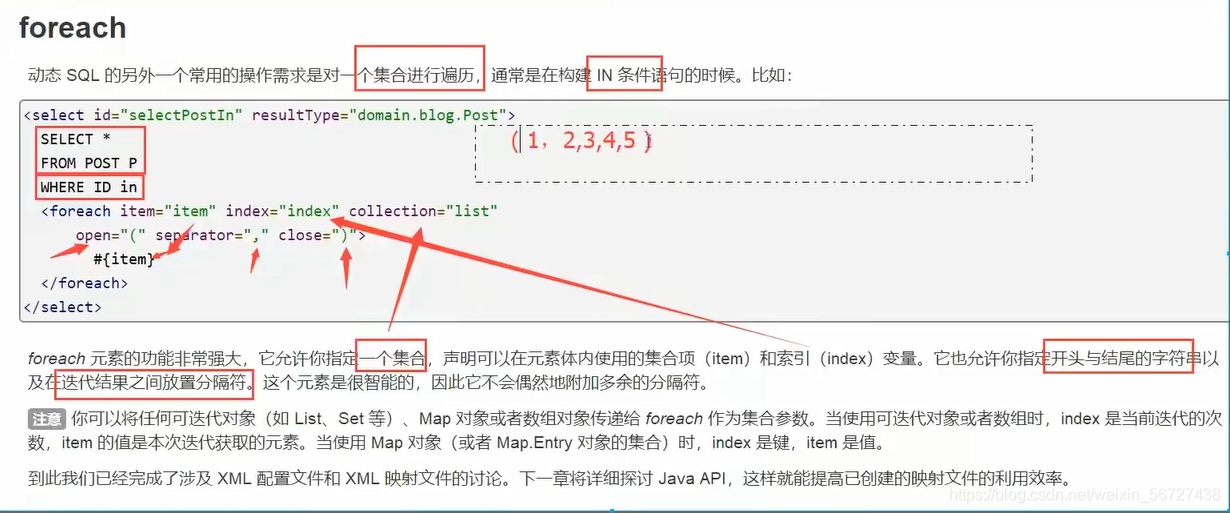
<!--select * from mybatis.blog where 1=1 and(id = 1 or id = 2 or id = 3)
-->
<select id="queryBlogForeach" parameterType="map" resultType="blog">
select * from mybatis.blog
<where>
<foreach collection="ids" item="id" open="and (" close=")" separator="or">
id = #{id}
</foreach>
</where>
</select>
动态SQL就是在拼接语句,我们只要保证SQL的正确性,按照SQL的格式,去排列组合就可以了
建议:
先在Mysql中写出完整的SQL,再去对应的去修改成为我们的动态SQL实现通用即可!
4、缓存
4.1、简介
1、什么是缓存 [ Cache ]?
存在内存中的临时数据。
将用户经常查询的数据放在缓存(内存)中,用户去查询数据就不用从磁盘上(关系型数据库数据文件)查询,从缓存中查询,从而提高查询效率,解决了高并发系统的性能问题。
2、为什么使用缓存?
减少和数据库的交互次数,减少系统开销,提高系统效率。
3、什么样的数据能使用缓存?
经常查询并且不经常改变的数据。
4.2、Mybatis缓存
MyBatis包含一个非常强大的查询缓存特性,它可以非常方便地定制和配置缓存。缓存可以极大的提升查询效率。
MyBatis系统中默认定义了两级缓存:一级缓存和二级缓存
默认情况下,只有一级缓存开启。(SqlSession级别的缓存,也称为本地缓存)
二级缓存需要手动开启和配置,他是基于namespace级别的缓存。
为了提高扩展性,MyBatis定义了缓存接口Cache。我们可以通过实现Cache接口来自定义二级缓存
4.3、一级缓存
一级缓存也叫本地缓存:
与数据库同一次会话期间查询到的数据会放在本地缓存中。
以后如果需要获取相同的数据,直接从缓存中拿,没必须再去查询数据库;
测试步骤:
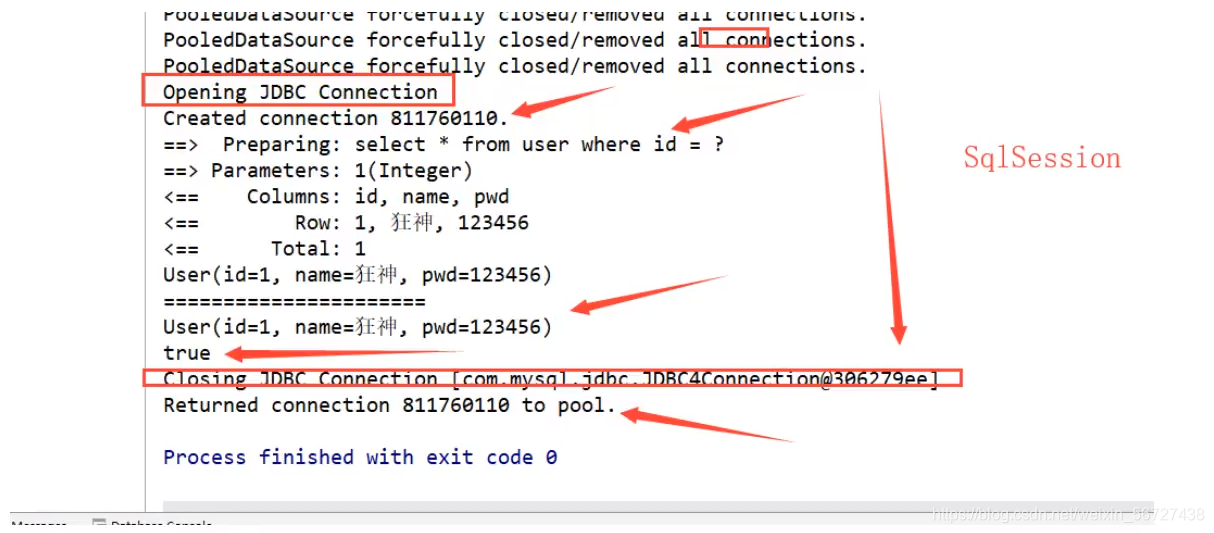
开启日志
测试在一个SqlSession中查询两次相同记录
查看日志输出
缓存失效的情况:
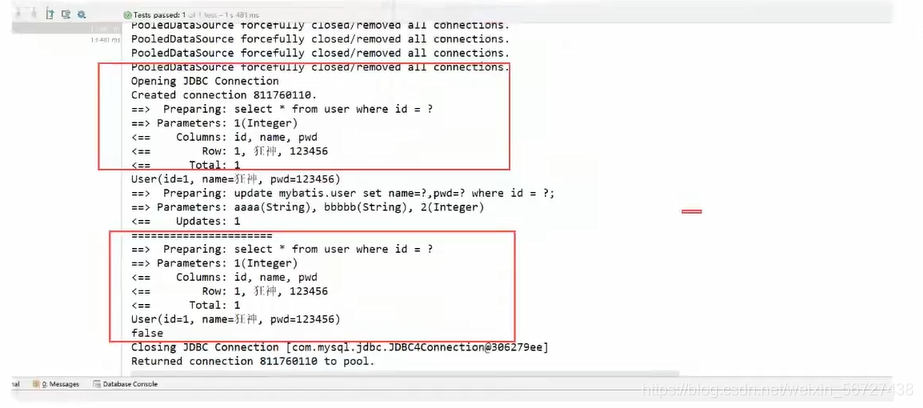
查询两次不同的记录
增删改操作,可能会改变原来的数据,所以必定会刷新缓存
查询不同的Mapper.xml
手动清理缓存!
小结:一级缓存默认是开启的,只在一次SqlSession中有效,也就是拿到连接到关闭连接这个区间段
一级缓存就是一个Map。
4.4、二级缓存
二级缓存也叫全局缓存,一级缓存作用域太低了,所以诞生了二级缓存
基于namespace级别的缓存,一个名称空间,对应一个二级缓存;
工作机制
一个会话查询一条数据,这个数据就会被放在当前会话的一级缓存中;
如果当前会话关闭了,这个会话对应的一级缓存就没了;但是我们想要的是,会话关闭了,一级缓存中的数据被保存到二级缓存中;
新的会话查询信息,就可以从二级缓存中获取内容;
不同的mapper查出的数据会放在自己对应的缓存(map)中;
使用步骤:
显示的开启全局缓存
<setting name="cacheEnabled" value="true"/>在要使用二级缓存中开启
<cache/>也可以自定义一些参数
<cache eviction="FIFO"flushInterval="60000"
size="512"
readOnly="true"/>
测试:
问题:我们需要将实体类序列化!否则就会报错!
小结:
只要开启了二级缓存,在同一个Mapper下就有效
所有的数据都会先放在一级缓存中
只有当会话提交,或者关闭的时候,才会提交到二级缓存
4.5、缓存原理
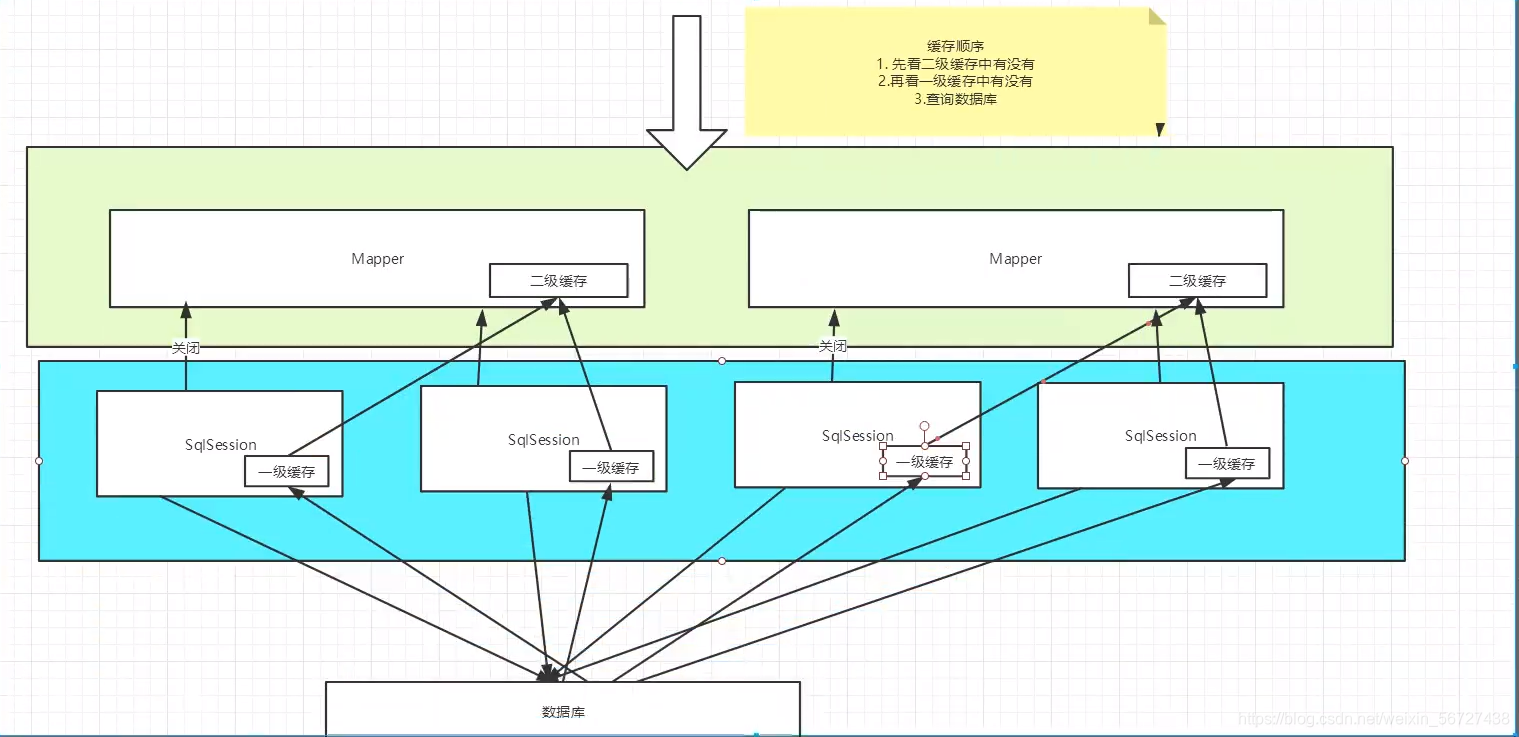
原理说明
我们将和数据库的一次连接看作是一次会话,那么一级缓存就存在于这一次会话中。当会话未提交或者未关闭的时候,我们可以从一级缓存中查询。
如果会话要提交或者关闭了,如果二级缓存开启了。那么一级缓存中的内容会被保存到二级缓存中。从而在一个命名空间中都有效。
4.6、自定义缓存(Ehcache)
Ehcache是一种广泛使用的java分布式缓存,用于通用缓存;
要在应用程序中使用Ehcache,需要引入依赖的jar包
<!-- https://mvnrepository.com/artifact/org.mybatis.caches/mybatis-ehcache --><dependency>
<groupId>org.mybatis.caches</groupId>
<artifactId>mybatis-ehcache</artifactId>
<version>1.1.0</version>
</dependency>
在mapper.xml中使用对应的缓存即可
<mapper namespace = “org.acme.FooMapper” > <cache type = “org.mybatis.caches.ehcache.EhcacheCache” />
</mapper>
编写ehcache.xml文件,如果在加载时未找到/ehcache.xml资源或出现问题,则将使用默认配置。
<?xml version="1.0" encoding="UTF-8"?><ehcache xmlns:xsi="http://www.w3.org/2001/XMLSchema-instance"
xsi:noNamespaceSchemaLocation="http://ehcache.org/ehcache.xsd"
updateCheck="false">
<!--
diskStore:为缓存路径,ehcache分为内存和磁盘两级,此属性定义磁盘的缓存位置。参数解释如下:
user.home – 用户主目录
user.dir – 用户当前工作目录
java.io.tmpdir – 默认临时文件路径
-->
<diskStore path="./tmpdir/Tmp_EhCache"/>
<defaultCache
eternal="false"
maxElementsInMemory="10000"
overflowToDisk="false"
diskPersistent="false"
timeToIdleSeconds="1800"
timeToLiveSeconds="259200"
memoryStoreEvictionPolicy="LRU"/>
<cache
name="cloud_user"
eternal="false"
maxElementsInMemory="5000"
overflowToDisk="false"
diskPersistent="false"
timeToIdleSeconds="1800"
timeToLiveSeconds="1800"
memoryStoreEvictionPolicy="LRU"/>
<!--
defaultCache:默认缓存策略,当ehcache找不到定义的缓存时,则使用这个缓存策略。只能定义一个。
-->
<!--
name:缓存名称。
maxElementsInMemory:缓存最大数目
maxElementsOnDisk:硬盘最大缓存个数。
eternal:对象是否永久有效,一但设置了,timeout将不起作用。
overflowToDisk:是否保存到磁盘,当系统当机时
timeToIdleSeconds:设置对象在失效前的允许闲置时间(单位:秒)。仅当eternal=false对象不是永久有效时使用,可选属性,默认值是0,也就是可闲置时间无穷大。
timeToLiveSeconds:设置对象在失效前允许存活时间(单位:秒)。最大时间介于创建时间和失效时间之间。仅当eternal=false对象不是永久有效时使用,默认是0.,也就是对象存活时间无穷大。
diskPersistent:是否缓存虚拟机重启期数据 Whether the disk store persists between restarts of the Virtual Machine. The default value is false.
diskSpoolBufferSizeMB:这个参数设置DiskStore(磁盘缓存)的缓存区大小。默认是30MB。每个Cache都应该有自己的一个缓冲区。
diskExpiryThreadIntervalSeconds:磁盘失效线程运行时间间隔,默认是120秒。
memoryStoreEvictionPolicy:当达到maxElementsInMemory限制时,Ehcache将会根据指定的策略去清理内存。默认策略是LRU(最近最少使用)。你可以设置为FIFO(先进先出)或是LFU(较少使用)。
clearOnFlush:内存数量最大时是否清除。
memoryStoreEvictionPolicy:可选策略有:LRU(最近最少使用,默认策略)、FIFO(先进先出)、LFU(最少访问次数)。
FIFO,first in first out,这个是大家最熟的,先进先出。
LFU, Less Frequently Used,就是上面例子中使用的策略,直白一点就是讲一直以来最少被使用的。如上面所讲,缓存的元素有一个hit属性,hit值最小的将会被清出缓存。
LRU,Least Recently Used,最近最少使用的,缓存的元素有一个时间戳,当缓存容量满了,而又需要腾出地方来缓存新的元素的时候,那么现有缓存元素中时间戳离当前时间最远的元素将被清出缓存。
-->
</ehcache>
以后使用redis做数据库缓存