原文链接:https://blog.csdn.net/m0_68041576/article/details/137882852
一、概述
在应用程序的开发过程中,经常需要使用 Excel文件来进行数据的导入或导出。所以,在通过Java语言实现此类需求的时候,往往会面临着Excel文件的解析(导入)或生成(导出)。
在Java技术生态圈中,可以进行Excel文件处理的主流技术包括: Apache POI 、JXL、Alibaba EasyExcel等。
Apache POI基于 DOM方式进行解析,将文件直接加载内存,所以速度较快,适合 Excel文件数据量不︰大的应用场景。JXL只支持Excel 2003以下版本,所以不太常见。
Alibaba EasyExcel采用逐行读取的解析模式,将每一行的解析结果以观察者的模式通知处理(AnalysisEventListener),所以比较适合数据体量较大的Excel文件解析。
二、Apache POl
Apache POI 是用Java编写的免费开源的跨平台的 Java API , Apache POI提供给Java程序对Microsoft Office格式档案进行读写功能的API开源类库。
它分别提供对不同格式文件的解析:
HSSF-提供读写Microsoft Excel格式档案的功能。
XSSF-提供读写Microsoft Excel OOXML格式档案的功能。
HWPF-提供读写Microsoft Word格式档案的功能。
HSLF-提供读写Microsoft PowerPoint格式档案的功能。
HDGF-提供读写Microsoft Visio格式档案的功能。
三、XSSF解析Excel文件
HSSF 用于解析旧版本(*.xls)Excel文件,由于旧版本的Excel文件只能存在65535行数据,所以目前已经不常用。所以目前主要采用XSSF 进行新版本(*.xlsx) Exce文件的解析。
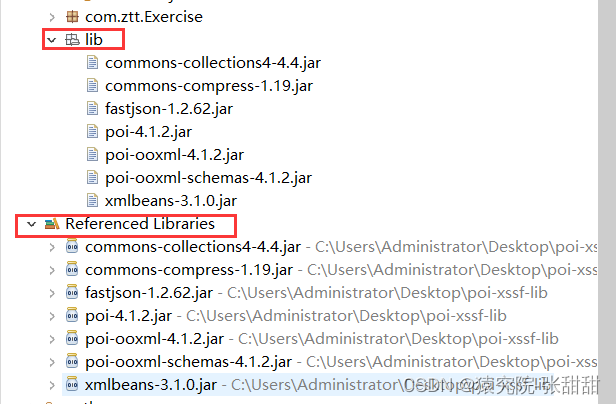
添加Jar包依赖
1.Workbook (Excel文件)
workbook接口代表一个Excel 文件,用于创建或加载(解析) Excel文件。常见实现类是XSSFWorkbook 。
创建Excel 文件
try (workbook workbook = new XSSFWorkbook();

Fileoutputstream fos = new Fileoutputstream("c: \|test\|temp.xlsx"))

{

    workbook.write(fos);

catch (IOException e)

{e.printstackTrace();
加载(解析)Exce1文件
//输入流

FileInputstream fis = new FileInputstream(" c:\\test\\ip.xlsx");

// Excel文件对象

workbook workbook = new XSSFWorkbook(fis);
2.Sheet(工作簿)
通过workbook 来进行工作簿sheet对象的获取或创建。
创建工作表
//按照默认名称创建工作表

sheet sheet1 = workbook.createsheet();

//按照自定义名称创建工作表

sheet sheet2 = workbook.createsheet("这是一个新表");
获取工作表
//按照工作表下标获取sheet

sheet sheeto1 = workbook.getsheetAt(0);

//按照工作表名称获取sheet

sheet sheet02 = workbook.getsheet("sheete");
获取工作表的数量
int n = workbook.getNumberofsheets();3.Row(数据行)
通过Sheet来进行数据行Row对象的获取或创建。
创建数据行
Row row = sheet.createRow(o);获取首行下标
int first = sheet.getFirstRowNum();获取尾行下标
int first = sheet.getFirstRowNum();根据下标获取指定行
Row row = sheet.getRow(o);遍历所有行
for( Row row : sheet) {

    system.out.println( row);

}
遍历指定区域行
for (int i = 1; i <= sheet.getLastRowNum(); i++) {

    Row row = sheet.getRow(i);

    System.out.println( row);

}
4.Cell(单元格)
通过Row来进行单元格cell 对象的获取或创建。
创建单元格
cell cell0 = row.createcell(0);设置单元格值
cello.setcellvalue(UUID.randomUUID().tostring());根据下标获取单元格
cell cell = row.getcell(1);遍历单元格
for( cell cell : row){

}
获取单元格类型
cellType type = cell.getcellType();设置单元格样式
//创建单元格样式

cellstyle headercellstyle = workbook.createcellstyle();
//设置单元格的水平对齐类型,此时水平居中

headercellstyle.setAlignment(HorizontalAlignment.CENTER);

//设置单元格的垂直对齐类型,此时垂直靠底边

headercellstyle.setVerticalAlignment(verticalAlignment.BOTTOM);

//创建并设置字体

Font font = workbook.createFont();font.setBold(true);

font.setcolor(Font.COLOR_RED);headercellstyle.setFont(font);
设置单元格数据样式
//创建单元格样式

DataFormat dataFormat = workbook.createDataFormat();

short formatcode = dataFormat.getFormat("yyyy-MM-dd HH:mm:ss");cellstyle cellstyle = workbook.createcellstyle();

cellstyle.setDataFormat(formatcode);


//为当前行创建单元格

cell cell1 = row.createcell(1);

cell1.setcellstyle(cellstyle);//设置单元格样式

cell1.setcellvalue(new Date());//保存当前日期时间至本单元格
设置单元格对齐
//创建单元格样式

cellstyle cellstyle = workbook.createcellstyle();

//设置单元格的水平对齐类型。此时水平居中

cellstyle.setAlignment(HorizontalAlignment.CENTER);

//设置单元格的垂直对齐类型。此时垂直靠底边

cellstyle.setverticalAlignment(verticalAlignment.BOTTOM);
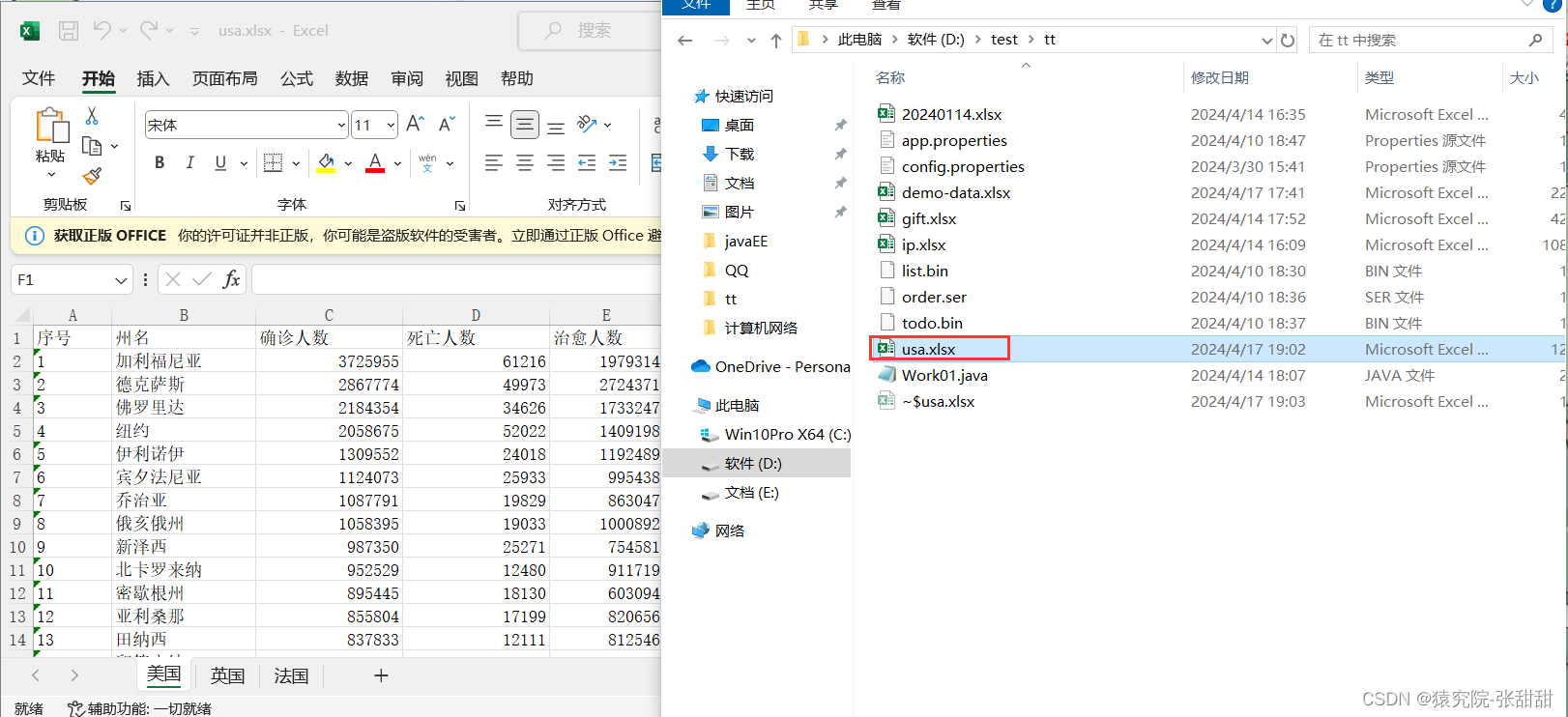
Excel 文件解析:读取文件,按照格式。
package com.ztt.Demo02;

//Excel文件解析:读取文件,按照格式,并获取文件数据内容

//【Apache POI开源类库用途】︰解析并生成Excel文件(word、PPT)

//【Apache PoI核心接口和类】:

//workbook接口:Excel文件的抽象

//HSSFworkbook实现类:*.xls老版本的Excel文件

//XSSFworkbook实现类:*xlsx新版本的Excel文件

//sheet接口:工作表

//Row接口:数据行

//cell接口:单元格


import java.io.FileInputStream;

import java.io.FileNotFoundException;

import java.io.IOException;


import org.apache.poi.hssf.usermodel.HSSFWorkbook;

import org.apache.poi.ss.usermodel.Cell;

import org.apache.poi.ss.usermodel.Row;

import org.apache.poi.ss.usermodel.Sheet;

import org.apache.poi.ss.usermodel.Workbook;

import org.apache.poi.xssf.usermodel.XSSFWorkbook;


public class demo01 {

	//Excel 文件解析:读取文件,按照格式,

	public static void main(String[] args) {

		//readExcel("D:\\test\\poi\\usa.xls" );


		readExcel("D:\\test\\tt\\usa.xlsx");


	}


	public static void readExcel(String path) {

		Workbook workbook=null;

		try {


			//workbook : Excel文件

			//workbook对象的创建


		if(path.endsWith(".xls")) {

			workbook=new HSSFWorkbook(new FileInputStream(path));

		}else if(path.endsWith(".xlsx")) {

			workbook=new XSSFWorkbook(path);

		}

		//Sheet:工作表

		//通过workbook对象,获取Excel文件中的一个工作表(Sheet类型的对象)

		//Sheet sheet = workbook.getSheet("美国");//按照工作表名称获取sheet

		Sheet sheet = workbook.getSheetAt(0);//按照工作表的下标获取sheet


		//Row:数据行

		//根据下标获取表格的第一行(列头)

		Row headRow=sheet.getRow(0);


		//Cell:单元格

		//获取列头中的每个单元格

		Cell cell0=headRow.getCell(0);//根据单元格的下标获取

		Cell cell1=headRow.getCell(1);

		Cell cell2=headRow.getCell(2);

		Cell cell3=headRow.getCell(3);

		Cell cell4=headRow.getCell(4);


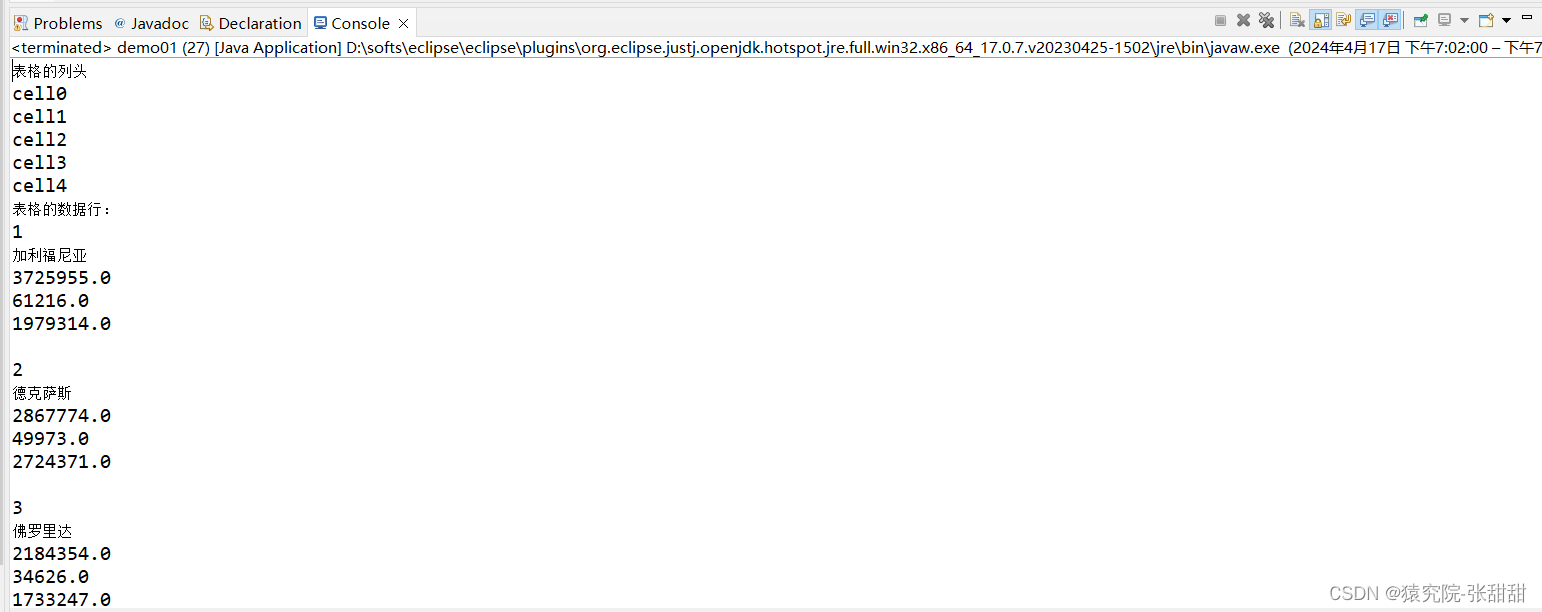
		System.out.println("表格的列头");

		System.out.println("cell0");

		System.out.println("cell1");

		System.out.println("cell2");

		System.out.println("cell3");

		System.out.println("cell4");


		//获取其余的数据行

		System.out.println("表格的数据行:");

		for (int i = 1; i <= sheet.getLastRowNum(); i++) {

			Row row = sheet.getRow( i);

			System.out.println(row.getCell(0));

			System.out.println(row.getCell(1));

			System.out.println(row.getCell(2));

			System.out.println(row.getCell(3));

			System.out.println(row.getCell(4));

			System.out.println();

			}


		} catch (FileNotFoundException e) {


			e.printStackTrace();

		} catch (IOException e1) {


			e1.printStackTrace();

		}finally {

			try {

					workbook.close();

				} catch (Exception e) {


					workbook=null;


					e.printStackTrace();

				}


		}


	}


}
package com.ztt.Demo02;


import java.io.IOException;

import java.util.Iterator;


import org.apache.poi.ss.usermodel.Cell;

import org.apache.poi.ss.usermodel.Row;

import org.apache.poi.ss.usermodel.Sheet;

import org.apache.poi.ss.usermodel.Workbook;

import org.apache.poi.xssf.usermodel.XSSFWorkbook;


//基于迭代器对Excel文件进行快速遍历

public class demo02 {

	public static void main(String[] args) {

		String path="D:\\test\\tt\\ip.xlsx";

		try(Workbook workbook=new XSSFWorkbook(path)){

			//传统写法:使用迭代器

			Iterator<Sheet> it=workbook.iterator();

			while(it.hasNext()) {

				Sheet sheet=it.next();

				Iterator<Row> rowIt=sheet.iterator();

				while(rowIt.hasNext()) {

					Row row=rowIt.next();

					Iterator<Cell> cellIt=row.iterator();

					while(cellIt.hasNext()) {

						Cell cell=cellIt.next();

					}

				}

			}


		//通过foreach语法进行优化

		for(Sheet sheet:workbook) {

			for(Row row:sheet) {

				for(Cell cell:row) {

					System.out.println(cell);

				}

				System.out.println();

			}

			System.out.println("------------");

			}


		} catch (IOException e) {

			e.printStackTrace();

		}

	}


}
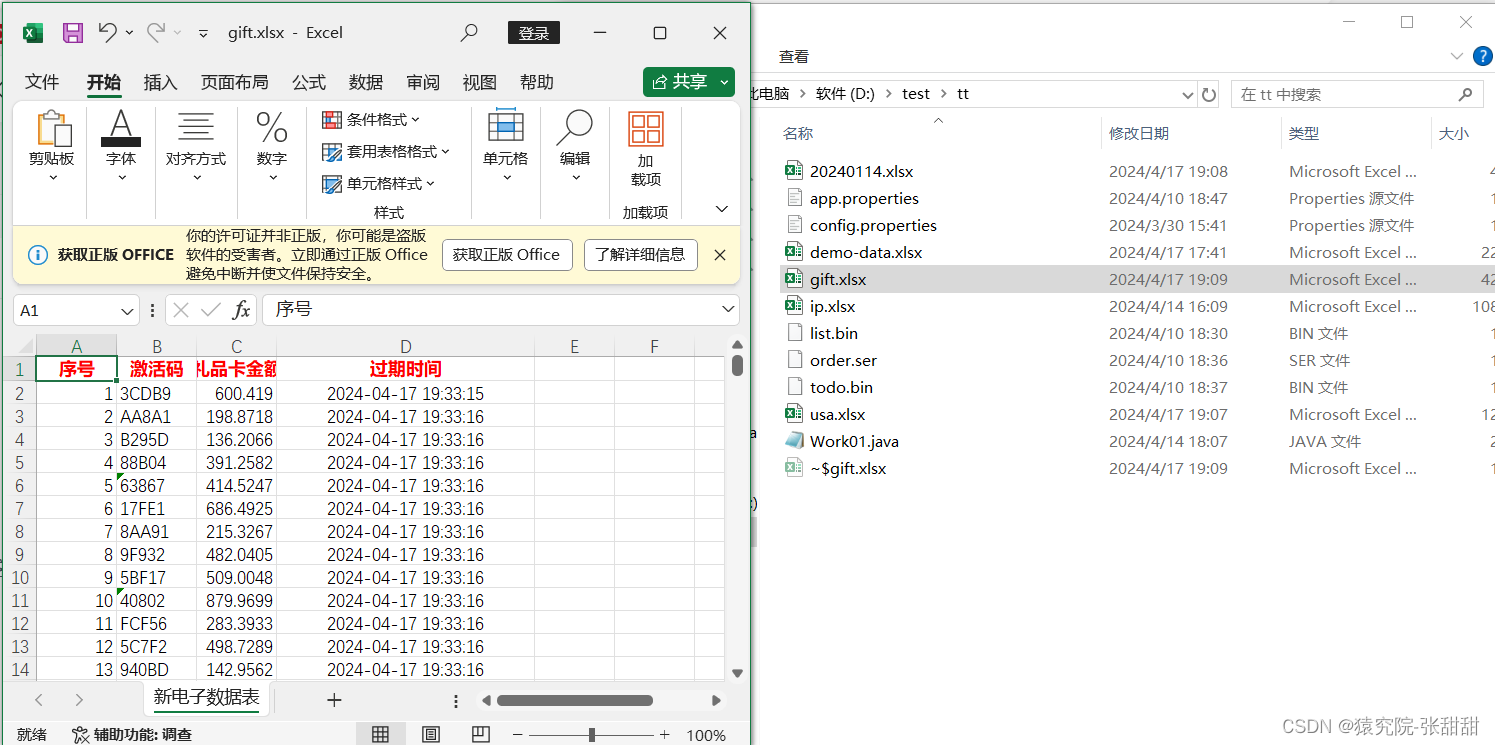
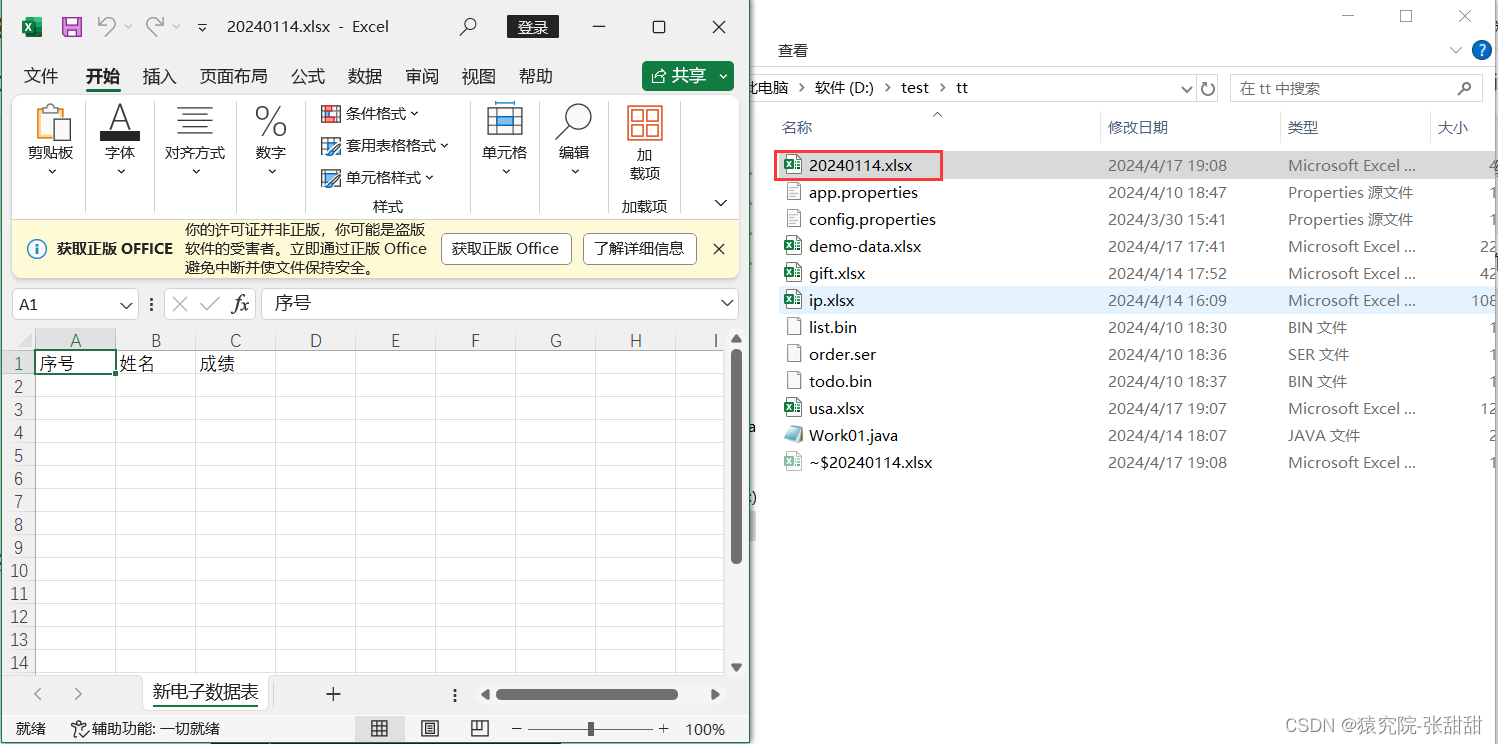
创建并生成一个Excel文件
package com.ztt.Demo02;


import java.io.FileOutputStream;

import java.io.IOException;


import org.apache.poi.ss.usermodel.Cell;

import org.apache.poi.ss.usermodel.Row;

import org.apache.poi.ss.usermodel.Sheet;

import org.apache.poi.ss.usermodel.Workbook;

import org.apache.poi.xssf.usermodel.XSSFWorkbook;


//创建并生成一个Excel文件

public class demo03 {

	public static void main(String[] args) {

		//创建Workbook

		try(Workbook workbook=new XSSFWorkbook()){


			//生成Sheet电子表

			Sheet sheet=workbook.createSheet("新电子数据表");


			//生成Row

			Row headRow=sheet.createRow(0);


			//生成单元格

			Cell cell0=headRow.createCell(0);

			Cell cell1=headRow.createCell(1);

			Cell cell2=headRow.createCell(2);


			//为单元格设置数据

			cell0.setCellValue("序号");

			cell1.setCellValue("姓名");

			cell2.setCellValue("成绩");


			//写入输出流

			workbook.write(new FileOutputStream("D:\\test\\tt\\20240114.xlsx"));


		} catch (IOException e) {

			e.printStackTrace();


		}

	}


}
package com.ztt.Demo02;


import java.io.FileOutputStream;

import java.io.IOException;

import java.util.Date;

import java.util.UUID;


import javax.annotation.processing.SupportedSourceVersion;


import org.apache.poi.ss.usermodel.Cell;

import org.apache.poi.ss.usermodel.CellStyle;

import org.apache.poi.ss.usermodel.DataFormat;

import org.apache.poi.ss.usermodel.Font;

import org.apache.poi.ss.usermodel.HorizontalAlignment;

import org.apache.poi.ss.usermodel.Row;

import org.apache.poi.ss.usermodel.Sheet;

import org.apache.poi.ss.usermodel.Workbook;

import org.apache.poi.xssf.usermodel.XSSFWorkbook;


//按照指定样式,创建并生成Excel文件

public class demo04 {

	public static void main(String[] args) {

		try(Workbook workbook=new XSSFWorkbook()){


			//创建Sheet电子表

			Sheet sheet=workbook.createSheet("新电子数据表");


			//创建列头Row

			Row headRow=sheet.createRow(0);


			//生成单元格

			Cell cell0=headRow.createCell(0);

			Cell cell1=headRow.createCell(1);

			Cell cell2=headRow.createCell(2);

			Cell cell3=headRow.createCell(3);


			//创建单元格样式

			CellStyle headCellStyle=workbook.createCellStyle();

			headCellStyle.setAlignment(HorizontalAlignment.CENTER);//水平居中


			Font headCellFont = workbook.createFont(); //字体对象

			headCellFont.setBold(true); //字体加粗

			headCellFont.setColor(Font.COLOR_RED);//字体颜色

			headCellStyle.setFont( headCellFont);


			cell0.setCellValue("序号");

			cell0.setCellStyle(headCellStyle);//单元格设置样式


			cell1.setCellValue("激活码");

			cell1.setCellStyle(headCellStyle);//单元格设置样式


			cell2.setCellValue("礼品卡金额");

			cell2.setCellStyle(headCellStyle);//单元格设置样式


			cell3.setCellValue("过期时间");

			cell3.setCellStyle(headCellStyle);//单元格设置样式


			//生成1000条数据

			//创建样式

			//创建日期格式对象

			CellStyle dateCellStyle=workbook.createCellStyle();

			dateCellStyle.setAlignment(HorizontalAlignment.CENTER);


			//创建货币格式的样式

			CellStyle moneyCellStyle=workbook.createCellStyle();


			//获取数据格式对象

			DataFormat fmt=workbook.createDataFormat();


			//获取格式编码

			//通过DataFormat根据自定义日期格式,获取对应的格式编码

			short dateFmtCode=fmt.getFormat("yyyy-MM-DD HH:mm:ss");

			System.out.println("自定义日期格式编码:"+dateFmtCode);


			short moneyFmtCode=fmt.getFormat("$###,#");

			System.out.println("自定义货币格式编码:"+moneyFmtCode);


			//CellStyle样式设置格式编码

			//设置自定义日期样式的格式编码值

			dateCellStyle.setDataFormat(dateFmtCode);


			//设置自定义货币样式的格式编码值

			moneyCellStyle.setDataFormat( moneyFmtCode) ;

			for(int i=1;i<1000;i++) {

				//创建数据行

				Row row=sheet.createRow(i);


				//每个数据行生成四个单元格

				Cell dataCell0=row.createCell(0);

				Cell dataCell1=row.createCell(1);

				Cell dataCell2=row.createCell(2);

				Cell dataCell3=row.createCell(3);


				//填充数据

				//序号

				dataCell0.setCellValue(i);


				//激活码

				dataCell1.setCellValue(UUID.randomUUID().toString().substring(0,5).toUpperCase());


				//金额

				dataCell2.setCellValue(Math.random()*1000);


				//过期时间

				dataCell3.setCellValue(new Date(System.currentTimeMillis()+1000*60*24));

				dataCell3.setCellStyle(dateCellStyle);//设置指定格式的setCellStyle

			}


			//写入输出流

			workbook.write(new FileOutputStream("D:\\test\\tt\\gift.xlsx"));

		} catch (IOException e) {

			e.printStackTrace();

		}


	}


}