
天行健,君子以自强不息;地势坤,君子以厚德载物。
每个人都有惰性,但不断学习是好好生活的根本,共勉!
文章均为学习整理笔记,分享记录为主,如有错误请指正,共同学习进步。
谁家玉笛暗飞声,散入春风满洛城。
此夜曲中闻折柳,何人不起故园情。
------《春夜洛城闻笛》
文章目录
JS(JavaScript)入门指南
JS(JavaScript)入门指南(DOM、事件处理、BOM、数据校验)
JS(JavaScript)学习专栏
JS(JavaScript)事件处理(事件绑定)趣味案例
通过创建一个页面来实现事件处理相关的操作,以下为实例演示部分,主要针对dom操作表格以及事件相关的操作。
1. 创建表格
创建一个表格,表格每行最后有一个按钮,按钮为删除当前行的事件
表格页脚有两个按钮:首行删除和末行删除
1.1 示例代码
示例代码如下
<!DOCTYPE html>
<html lang="en">
<head>
    <meta charset="UTF-8">
    <meta name="viewport" content="width=device-width, initial-scale=1.0">
    <title>使用dom操作表格-创建一个表格</title>

</head>
<body>

    <!-- 将表格放到div块中,方便后续操作 -->
    <div id="container">
        <!-- 表格 -->
        <table id="tt">

            <!-- 表头 -->
            <thead>
                <tr>
                    <th>召唤师</th>
                    <th>英雄</th>
                    <th>定位</th>
                    <th>金币</th>
                    <th>技能</th>
                </tr>
            </thead>

            <!-- 表格体 -->
            <tbody id="tb">
                <tr>
                    <th>寒山</th>
                    <th>李白</th>
                    <th>刺客</th>
                    <th>38000</th>
                    <th><input type="button" value="惊鸿一剑" class="del"></th>
                </tr>
                <tr>
                    <th>李四</th>
                    <th>廉颇</th>
                    <th>坦克</th>
                    <th>11800</th>
                    <th><input type="button" value="地动山摇" class="del"></th>
                </tr>
                <tr>
                    <th>赵五</th>
                    <th>貂蝉</th>
                    <th>法师</th>
                    <th>38000</th>
                    <th><input type="button" value="随风起舞" class="del"></th>
                </tr>
                <tr>
                    <th>王二</th>
                    <th>后羿</th>
                    <th>射手</th>
                    <th>8800</th>
                    <th><input type="button" value="百步穿杨" class="del"></th>
                </tr>
            </tbody>

            <!-- 表格页脚 -->
            <tfoot>
                <tr>
                    <td colspan="5">
                        <input type="button" value="从首行删除" id="btnDelFirst">
                        <input type="button" value="从末行删除" id="btnDelLast">
                    </td>
                </tr>
            </tfoot>
        </table>
    </div>
</body>
</html>
1.2 页面效果
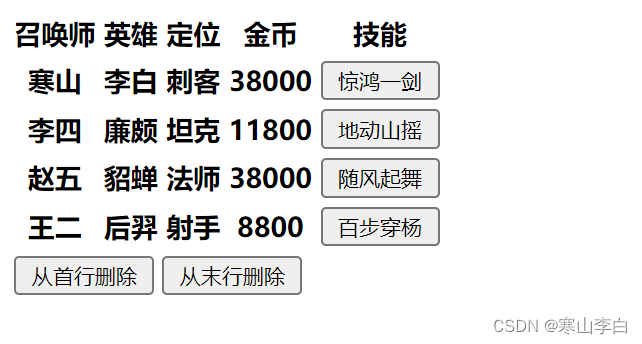
使用浏览器打开页面,效果如下,此时按钮并未生效,需要后续绑定事件
2. 创建表单
在前面表格的基础上,创建一个表单,表单中设置的是input输入,有文本、单选、按钮,用来对上面的表格进行数据的操作
2.1 示例代码
表单示例代码如下
<!DOCTYPE html>
<html lang="en">
<head>
    <meta charset="UTF-8">
    <meta name="viewport" content="width=device-width, initial-scale=1.0">
    <title>使用dom操作表格-创建一个form表单</title>

</head>
<body>

    <div id="container">
        <!-- 表格 -->
        <table id="tt">

            <!-- 表头 -->
            <thead>
                <tr>
                    <th>召唤师</th>
                    <th>英雄</th>
                    <th>定位</th>
                    <th>金币</th>
                    <th>技能</th>
                </tr>
            </thead>

            <!-- 表格体 -->
            <tbody id="tb">
                <tr>
                    <th>寒山</th>
                    <th>李白</th>
                    <th>刺客</th>
                    <th>38000</th>
                    <th><input type="button" value="惊鸿一剑" class="del"></th>
                </tr>
                <tr>
                    <th>李四</th>
                    <th>廉颇</th>
                    <th>坦克</th>
                    <th>11800</th>
                    <th><input type="button" value="地动山摇" class="del"></th>
                </tr>
                <tr>
                    <th>赵五</th>
                    <th>貂蝉</th>
                    <th>法师</th>
                    <th>38000</th>
                    <th><input type="button" value="随风起舞" class="del"></th>
                </tr>
                <tr>
                    <th>王二</th>
                    <th>后羿</th>
                    <th>射手</th>
                    <th>8800</th>
                    <th><input type="button" value="百步穿杨" class="del"></th>
                </tr>
            </tbody>

            <!-- 表格页脚 -->
            <tfoot>
                <tr>
                    <td colspan="5">
                        <input type="button" value="从首行删除" id="btnDelFirst">
                        <input type="button" value="从末行删除" id="btnDelLast">
                    </td>
                </tr>
            </tfoot>
        </table>

        <hr>

        <!-- form表单创建 -->
        <form action="" id="formId">
            召唤师:<input type="text" id="name"><br>
            英雄:<input type="text" id="heroName"><br>
            定位:<input type="radio" name="actor" value="tank" id="tank" checked> 坦克
                  <input type="radio" name="actor" value="warrior" id="warrior"> 战士
                  <input type="radio" name="actor" value="assassin" id="assassin"> 刺客
                  <input type="radio" name="actor" value="master" id="master"> 法师
                  <input type="radio" name="actor" value="shooter" id="shooter"> 射手
                  <input type="radio" name="actor" value="addjunct" id="addjunct"> 辅助<br>
            价格:<input type="text" id="price"><br>
            技能:<input type="text" id="func"><br>
                  <input type="button" value="添  加" id="btnAdd">
                  <input type="button" value="重  置">
        </form>
    </div>

</body>
</html>
2.2 页面效果
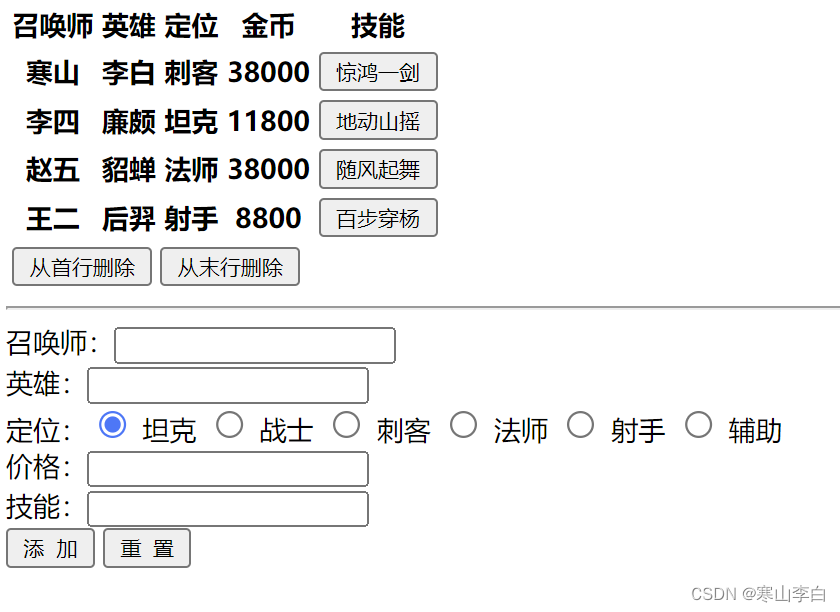
使用浏览器打开页面,如下,表单中的事件也并未绑定,暂时无效
3. 添加样式
为表格和表单添加样式,优化以下视觉效果
3.1 示例代码
示例代码如下
<!DOCTYPE html>
<html lang="en">
<head>
    <meta charset="UTF-8">
    <meta name="viewport" content="width=device-width, initial-scale=1.0">
    <title>使用dom操作表格-为表格和表单添加样式</title>

    <style>
        /* 设置整个div块在页面中的位置 */
        #container{

            /* 居中 */
            text-align: center;
        }

        /* 设置table表格的样式 */
        #tt{

            /* 宽度 */
            width: 500px;
            /* 居中 */
            text-align: center;
            /* 边界设置 实线 灰色 */
            border: 1px solid #ccc;
            /* 边框设置 上下设为0 左右设为自动 */
            margin: 0 auto;
        }

        /* table下的td和th样式设置 */
        #tt td, #tt th{

            /* 边界设置 实线 灰色 */
            border: 1px solid #ccc;
        }

        /* table下的页脚的td样式设置 */
        #tt tfoot td{

            /* 靠右 */
            text-align: right;
        }

        /* 表单的样式设置 */
        #formId{

            /* 每行的间隔设置 */
            line-height: 30px;
        }
    </style>

</head>
<body>

    <div id="container">
        <!-- 表格 -->
        <table id="tt">

            <!-- 表头 -->
            <thead>
                <tr>
                    <th>召唤师</th>
                    <th>英雄</th>
                    <th>定位</th>
                    <th>金币</th>
                    <th>技能</th>
                </tr>
            </thead>

            <!-- 表格体 -->
            <tbody id="tb">
                <tr>
                    <th>寒山</th>
                    <th>李白</th>
                    <th>刺客</th>
                    <th>38000</th>
                    <th><input type="button" value="惊鸿一剑" class="del"></th>
                </tr>
                <tr>
                    <th>李四</th>
                    <th>廉颇</th>
                    <th>坦克</th>
                    <th>11800</th>
                    <th><input type="button" value="地动山摇" class="del"></th>
                </tr>
                <tr>
                    <th>赵五</th>
                    <th>貂蝉</th>
                    <th>法师</th>
                    <th>38000</th>
                    <th><input type="button" value="随风起舞" class="del"></th>
                </tr>
                <tr>
                    <th>王二</th>
                    <th>后羿</th>
                    <th>射手</th>
                    <th>8800</th>
                    <th><input type="button" value="百步穿杨" class="del"></th>
                </tr>
            </tbody>

            <!-- 表格页脚 -->
            <tfoot>
                <tr>
                    <td colspan="5">
                        <input type="button" value="从首行删除" id="btnDelFirst">
                        <input type="button" value="从末行删除" id="btnDelLast">
                    </td>
                </tr>
            </tfoot>
        </table>

        <hr>

        <!-- form表单创建 -->
        <form action="" id="formId">
            召唤师:<input type="text" id="name"><br>
            英雄:<input type="text" id="heroName"><br>
            定位:<input type="radio" name="actor" value="tank" id="tank" checked> 坦克
                  <input type="radio" name="actor" value="warrior" id="warrior"> 战士
                  <input type="radio" name="actor" value="assassin" id="assassin"> 刺客
                  <input type="radio" name="actor" value="master" id="master"> 法师
                  <input type="radio" name="actor" value="shooter" id="shooter"> 射手
                  <input type="radio" name="actor" value="addjunct" id="addjunct"> 辅助<br>
            价格:<input type="text" id="price"><br>
            技能:<input type="text" id="func"><br>
                  <input type="button" value="添  加" id="btnAdd">
                  <input type="button" value="重  置">
        </form>
    </div>

</body>
</html>
3.2 页面效果
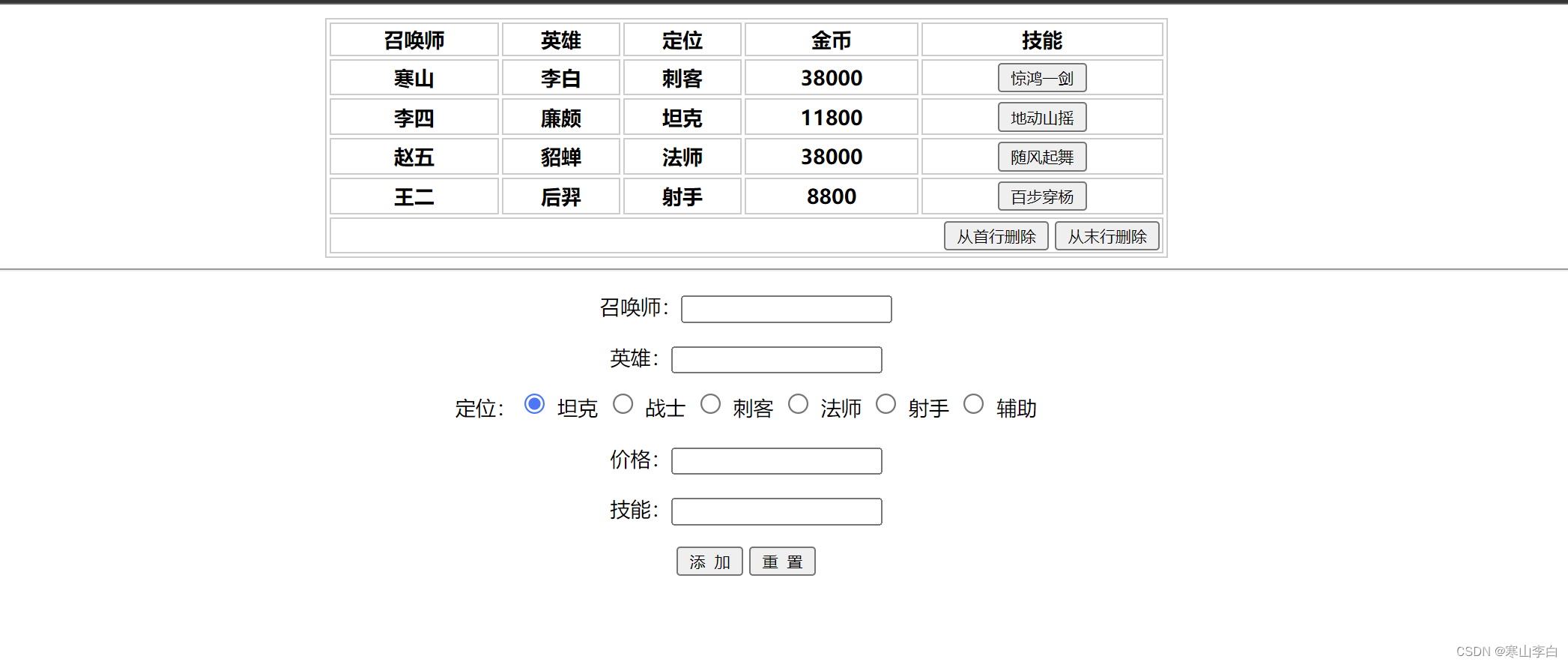
使用浏览器打开页面,如下,看起来好一点点
4. 表格中的事件绑定
先为表格中的按钮绑定事件,编写js代码
4.1 示例代码
示例代码如下
<!DOCTYPE html>
<html lang="en">
<head>
    <meta charset="UTF-8">
    <meta name="viewport" content="width=device-width, initial-scale=1.0">
    <title>使用dom操作表格-为表格中的按钮绑定事件</title>

    <style>
        /* 设置整个div块在页面中的位置 */
        #container{

            /* 居中 */
            text-align: center;
        }

        /* 设置table表格的样式 */
        #tt{

            /* 宽度 */
            width: 500px;
            /* 居中 */
            text-align: center;
            /* 边界设置 实线 灰色 */
            border: 1px solid #ccc;
            /* 边框设置 上下设为0 左右设为自动 */
            margin: 0 auto;
        }

        /* table下的td和th样式设置 */
        #tt td, #tt th{

            /* 边界设置 实线 灰色 */
            border: 1px solid #ccc;
        }

        /* table下的页脚的td样式设置 */
        #tt tfoot td{

            /* 靠右 */
            text-align: right;
        }

        /* 表单的样式设置 */
        #formId{

            /* 每行的间隔设置 */
            line-height: 30px;
        }
    </style>

    <script>

        //页面加载完之后触发事件
        window.onload=function(){

            //为技能按钮绑定事件(删除,点击技能释放大招,删除当前行)
            var btFuns = document.querySelectorAll(".del");
            //遍历所有按钮,移出当前行,即tr
            for(var i=0;i<btFuns.length;i++){

                btFuns[i].onclick=function(){

                    //当前获取的位置是input标签,其父标签的父标签为tr标签
                    this.parentNode.parentNode.remove();
                }
            }

            //为首行删除按钮绑定事件
            $("btnDelFirst").onclick=function(){

                //通过获取tb的document对象,然后通过标签tr获取集合,删除第一个tr
                $("tb").getElementsByTagName("tr")[0].remove();
            }
            //为末行删除按钮绑定事件
            $("btnDelLast").onclick=function(){

                //获取tb下的tr集合
                var trs = $("tb").getElementsByTagName("tr");
                //移出最后一个tr
                trs[trs.length-1].remove();;
            }
        }

        //获取元素的函数
        function $(id){

            return document.getElementById(id);
        }

    </script>

</head>
<body>

    <div id="container">
        <!-- 表格 -->
        <table id="tt">

            <!-- 表头 -->
            <thead>
                <tr>
                    <th>召唤师</th>
                    <th>英雄</th>
                    <th>定位</th>
                    <th>金币</th>
                    <th>技能</th>
                </tr>
            </thead>

            <!-- 表格体 -->
            <tbody id="tb">
                <tr>
                    <th>寒山</th>
                    <th>李白</th>
                    <th>刺客</th>
                    <th>38000</th>
                    <th><input type="button" value="惊鸿一剑" class="del"></th>
                </tr>
                <tr>
                    <th>李四</th>
                    <th>廉颇</th>
                    <th>坦克</th>
                    <th>11800</th>
                    <th><input type="button" value="地动山摇" class="del"></th>
                </tr>
                <tr>
                    <th>赵五</th>
                    <th>貂蝉</th>
                    <th>法师</th>
                    <th>38000</th>
                    <th><input type="button" value="随风起舞" class="del"></th>
                </tr>
                <tr>
                    <th>王二</th>
                    <th>后羿</th>
                    <th>射手</th>
                    <th>8800</th>
                    <th><input type="button" value="百步穿杨" class="del"></th>
                </tr>
            </tbody>

            <!-- 表格页脚 -->
            <tfoot>
                <tr>
                    <td colspan="5">
                        <input type="button" value="从首行删除" id="btnDelFirst">
                        <input type="button" value="从末行删除" id="btnDelLast">
                    </td>
                </tr>
            </tfoot>
        </table>

        <hr>

        <!-- form表单创建 -->
        <form action="" id="formId">
            召唤师:<input type="text" id="name"><br>
            英雄:<input type="text" id="heroName"><br>
            定位:<input type="radio" name="actor" value="tank" id="tank" checked> 坦克
                  <input type="radio" name="actor" value="warrior" id="warrior"> 战士
                  <input type="radio" name="actor" value="assassin" id="assassin"> 刺客
                  <input type="radio" name="actor" value="master" id="master"> 法师
                  <input type="radio" name="actor" value="shooter" id="shooter"> 射手
                  <input type="radio" name="actor" value="addjunct" id="addjunct"> 辅助<br>
            价格:<input type="text" id="price"><br>
            技能:<input type="text" id="func"><br>
                  <input type="button" value="添  加" id="btnAdd">
                  <input type="button" value="重  置">
        </form>
    </div>

</body>
</html>
4.2 页面效果
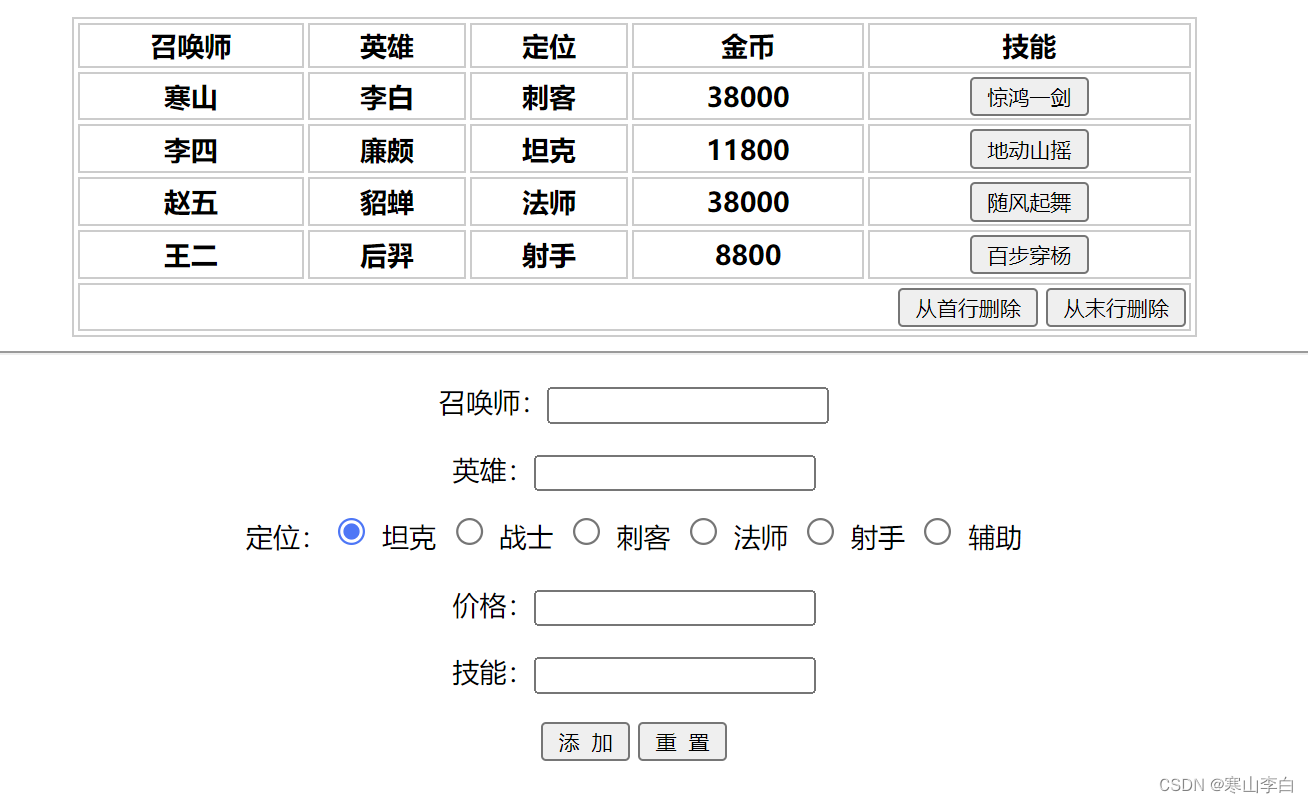
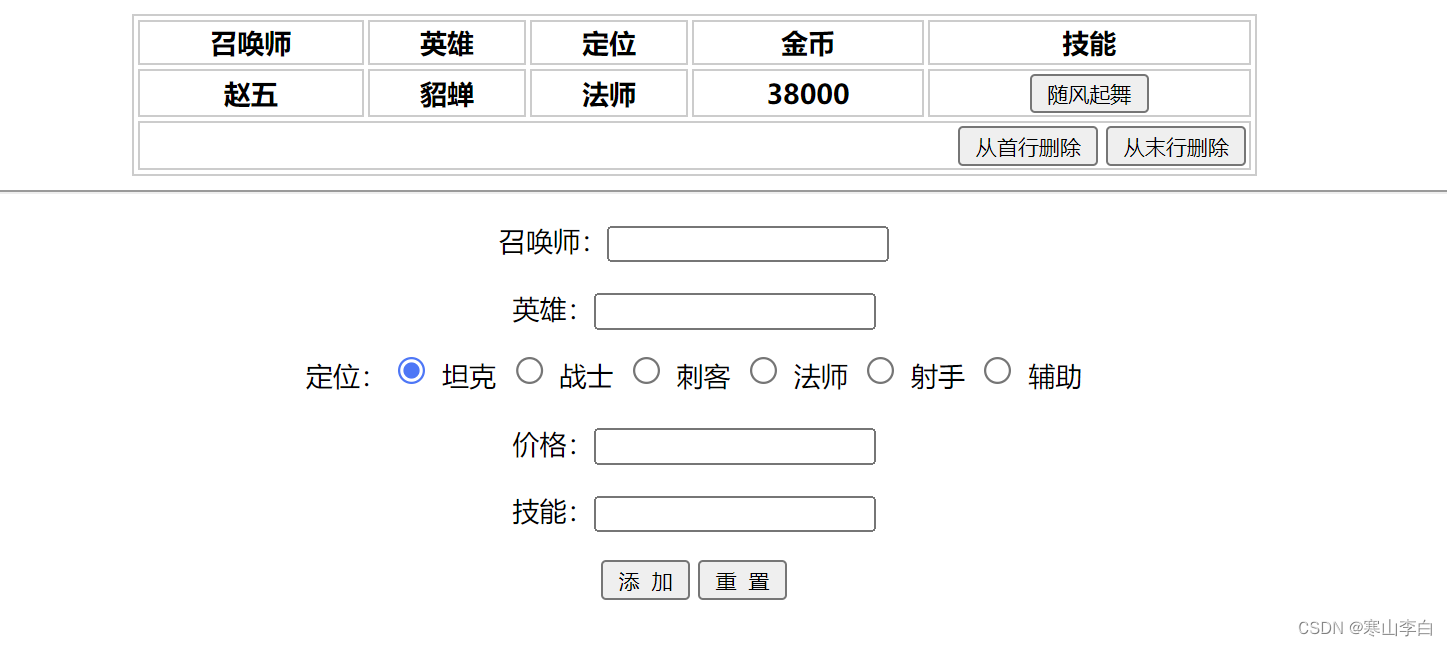
使用浏览器打开页面,如下,此时可以点击技能框里的技能进行删除当前行,也可以点击右下角的首行删除和末行删除进行首行和末行的删除
5. 表单中的事件绑定
5.1 示例代码
示例代码如下
<!DOCTYPE html>
<html lang="en">
<head>
    <meta charset="UTF-8">
    <meta name="viewport" content="width=device-width, initial-scale=1.0">
    <title>使用dom操作表格-为表单中的按钮绑定事件</title>

    <style>
        /* 设置整个div块在页面中的位置 */
        #container{

            /* 居中 */
            text-align: center;
            /* background-color: lightblue; */
        }

        /* 设置table表格的样式 */
        #tt{

            /* 宽度 */
            width: 500px;
            /* 居中 */
            text-align: center;
            /* 边界设置 实线 灰色 */
            border: 1px solid #ccc;
            /* 边框设置 上下设为0 左右设为自动 */
            margin: 0 auto;
            /* 表格背景色 */
            /* background-color: lightblue; */
        }

        /* table下的td和th样式设置 */
        #tt td, #tt th{

            /* 边界设置 实线 灰色 */
            border: 1px solid #ccc;
        }

        /* table下的页脚的td样式设置 */
        #tt tfoot td{

            /* 靠右 */
            text-align: right;
        }

        /* 表单的样式设置 */
        #formId{

            /* 每行的间隔设置 */
            line-height: 30px;
        }
    </style>

    <script>

        //页面加载完之后触发事件
        window.onload=function(){

            //为添加按钮绑定事件
            // document.getElementById("btnAdd")
            $("btnAdd").onclick=function(){

                //创建tr
                var tr = document.createElement("tr");
                //创建td
                var tdName = document.createElement("td");
                var tdHeroName = document.createElement("td");
                var tdActor = document.createElement("td");
                var tdPrice = document.createElement("td");
                var tdFun = document.createElement("td");
                //将数据添加到td中
                tdName.innerHTML=$("name").value;
                tdHeroName.innerHTML=$("heroName").value;

                // tdActor.innerHTML=$("actor").value;
                //根据勾选的位置将对应的值填入定位一栏
                if($("tank").checked){

                    tdActor.innerHTML=$("tank").value;
                }
                if($("warrior").checked){

                    tdActor.innerHTML=$("warrior").value;
                }
                if($("assassin").checked){

                    tdActor.innerHTML=$("assassin").value;
                }
                if($("master").checked){

                    tdActor.innerHTML=$("master").value;
                }
                if($("shooter").checked){

                    tdActor.innerHTML=$("shooter").value;
                }
                if($("addjunct").checked){

                    tdActor.innerHTML=$("addjunct").value;
                }
                tdPrice.innerHTML=$("price").value;
                // tdFun.innerHTML=$("func").value;
                //创建按钮
                var btnFun = document.createElement("input");
                btnFun.type = "button";
                btnFun.value = $("func").value;
                //为按钮绑定事件用于删除
                btnFun.onclick = function(){

                    this.parentNode.parentNode.remove();
                }
                tdFun.appendChild(btnFun);

                //将td添加到tr中
                tr.appendChild(tdName);
                tr.appendChild(tdHeroName);
                tr.appendChild(tdActor);
                tr.appendChild(tdPrice);
                tr.appendChild(tdFun);

                //将tr添加到tbody中
                $("tb").appendChild(tr);
            }

            //为技能按钮绑定事件(删除,点击技能释放大招,删除当前行)
            var btFuns = document.querySelectorAll(".del");
            //遍历所有按钮,移出当前行,即tr
            for(var i=0;i<btFuns.length;i++){

                btFuns[i].onclick=function(){

                    //当前获取的位置是input标签,其父标签的父标签为tr标签
                    this.parentNode.parentNode.remove();
                }
            }

            //为首行删除按钮绑定事件
            $("btnDelFirst").onclick=function(){

                //通过获取tb的document对象,然后通过标签tr获取集合,删除第一个tr
                $("tb").getElementsByTagName("tr")[0].remove();
            }
            //为末行删除按钮绑定事件
            $("btnDelLast").onclick=function(){

                //获取tb下的tr集合
                var trs = $("tb").getElementsByTagName("tr");
                //移出最后一个tr
                trs[trs.length-1].remove();;
            }
        }

        //获取元素的函数
        function $(id){

            return document.getElementById(id);
        }

    </script>

</head>
<body>

    <div id="container">
        <!-- 表格 -->
        <table id="tt">

            <!-- 表头 -->
            <thead>
                <tr>
                    <th>召唤师</th>
                    <th>英雄</th>
                    <th>定位</th>
                    <th>金币</th>
                    <th>技能</th>
                </tr>
            </thead>

            <!-- 表格体 -->
            <tbody id="tb">
                <tr>
                    <th>寒山</th>
                    <th>李白</th>
                    <th>刺客</th>
                    <th>38000</th>
                    <th><input type="button" value="惊鸿一剑" class="del"></th>
                </tr>
                <tr>
                    <th>李四</th>
                    <th>廉颇</th>
                    <th>坦克</th>
                    <th>11800</th>
                    <th><input type="button" value="地动山摇" class="del"></th>
                </tr>
                <tr>
                    <th>赵五</th>
                    <th>貂蝉</th>
                    <th>法师</th>
                    <th>38000</th>
                    <th><input type="button" value="随风起舞" class="del"></th>
                </tr>
                <tr>
                    <th>王二</th>
                    <th>后羿</th>
                    <th>射手</th>
                    <th>8800</th>
                    <th><input type="button" value="百步穿杨" class="del"></th>
                </tr>
            </tbody>

            <!-- 表格页脚 -->
            <tfoot>
                <tr>
                    <td colspan="5">
                        <input type="button" value="从首行删除" id="btnDelFirst">
                        <input type="button" value="从末行删除" id="btnDelLast">
                    </td>
                </tr>
            </tfoot>
        </table>

        <hr>

        <!-- form表单创建 -->
        <form action="" id="formId">
            召唤师:<input type="text" id="name"><br>
            英雄:<input type="text" id="heroName"><br>
            定位:<input type="radio" name="actor" value="tank" id="tank" checked> 坦克
                  <input type="radio" name="actor" value="warrior" id="warrior"> 战士
                  <input type="radio" name="actor" value="assassin" id="assassin"> 刺客
                  <input type="radio" name="actor" value="master" id="master"> 法师
                  <input type="radio" name="actor" value="shooter" id="shooter"> 射手
                  <input type="radio" name="actor" value="addjunct" id="addjunct"> 辅助<br>
            价格:<input type="text" id="price"><br>
            技能:<input type="text" id="func"><br>
                  <input type="button" value="添  加" id="btnAdd">
                  <input type="button" value="重  置">
        </form>
    </div>

</body>
</html>
5.2 页面效果
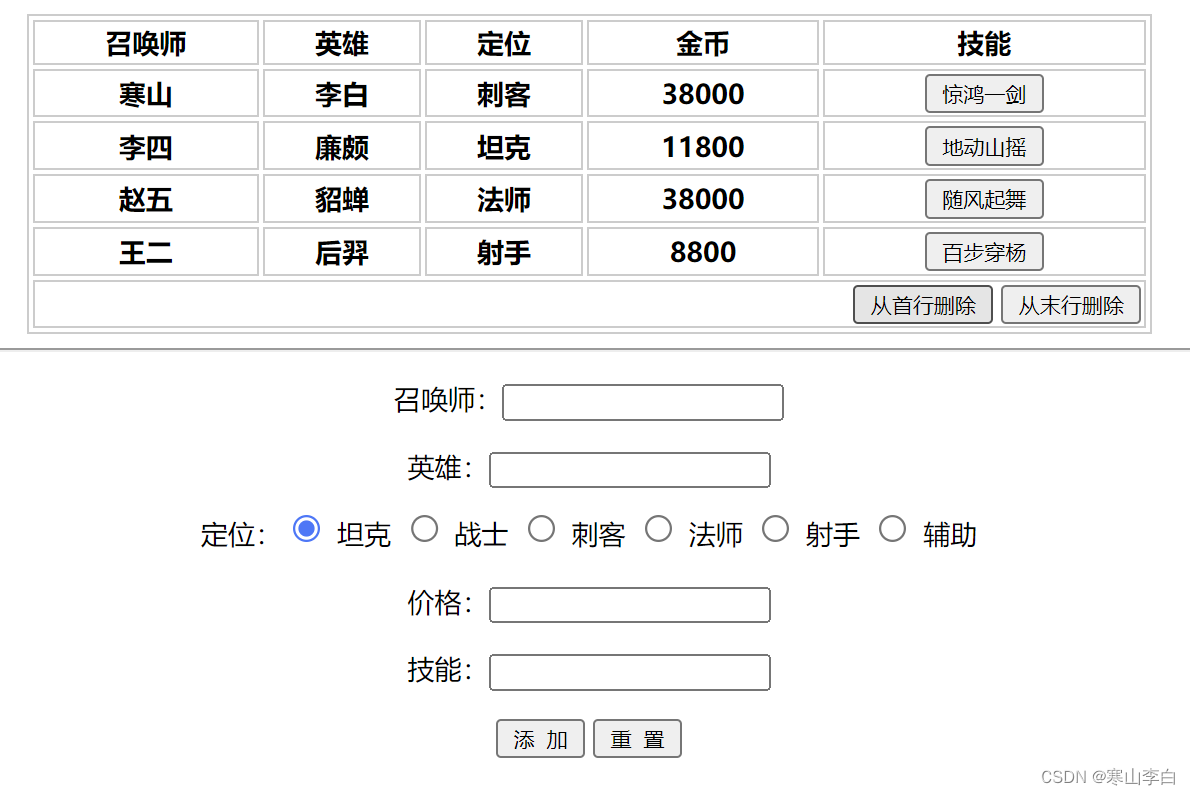
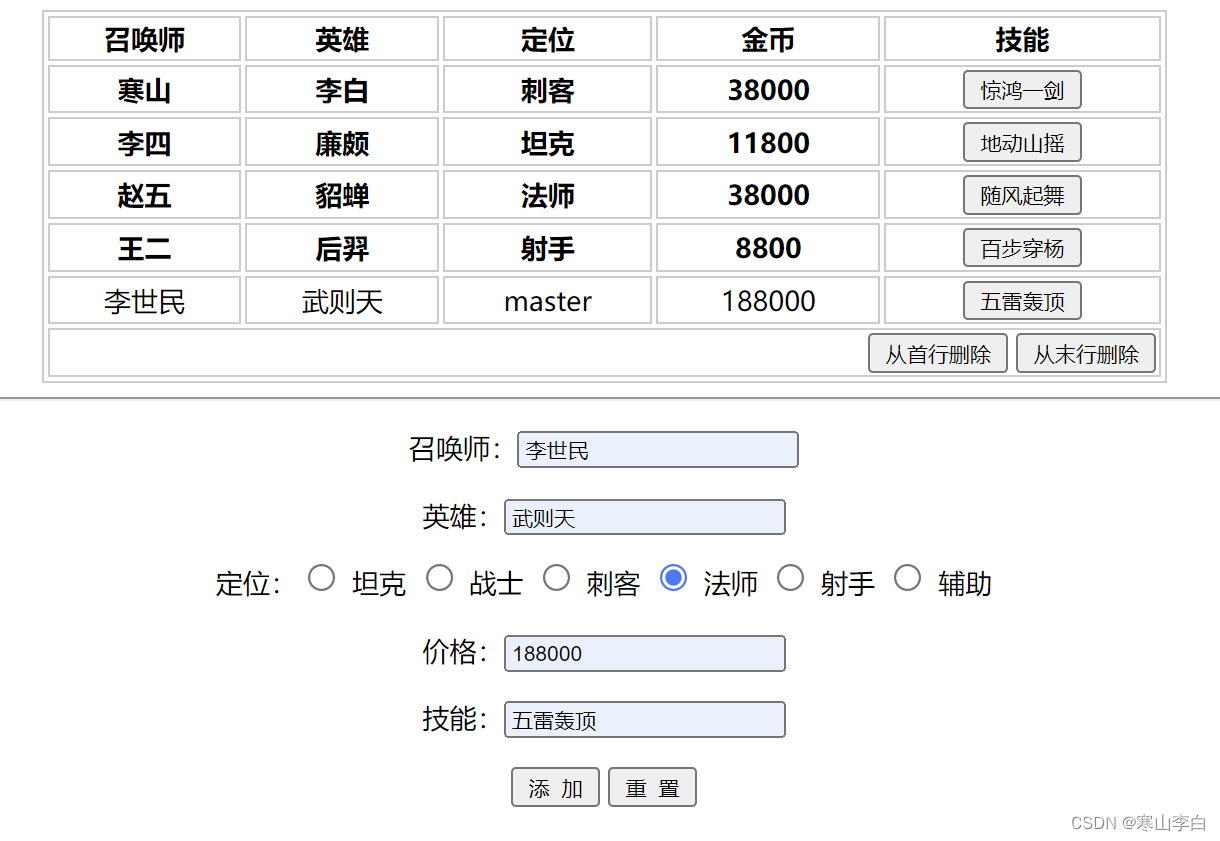
使用浏览器打开页面,如下,此时可以填写召唤师、英雄、价格、技能,然后勾选定位的位置,进行添加信息到表格中
6. 复选框功能实现
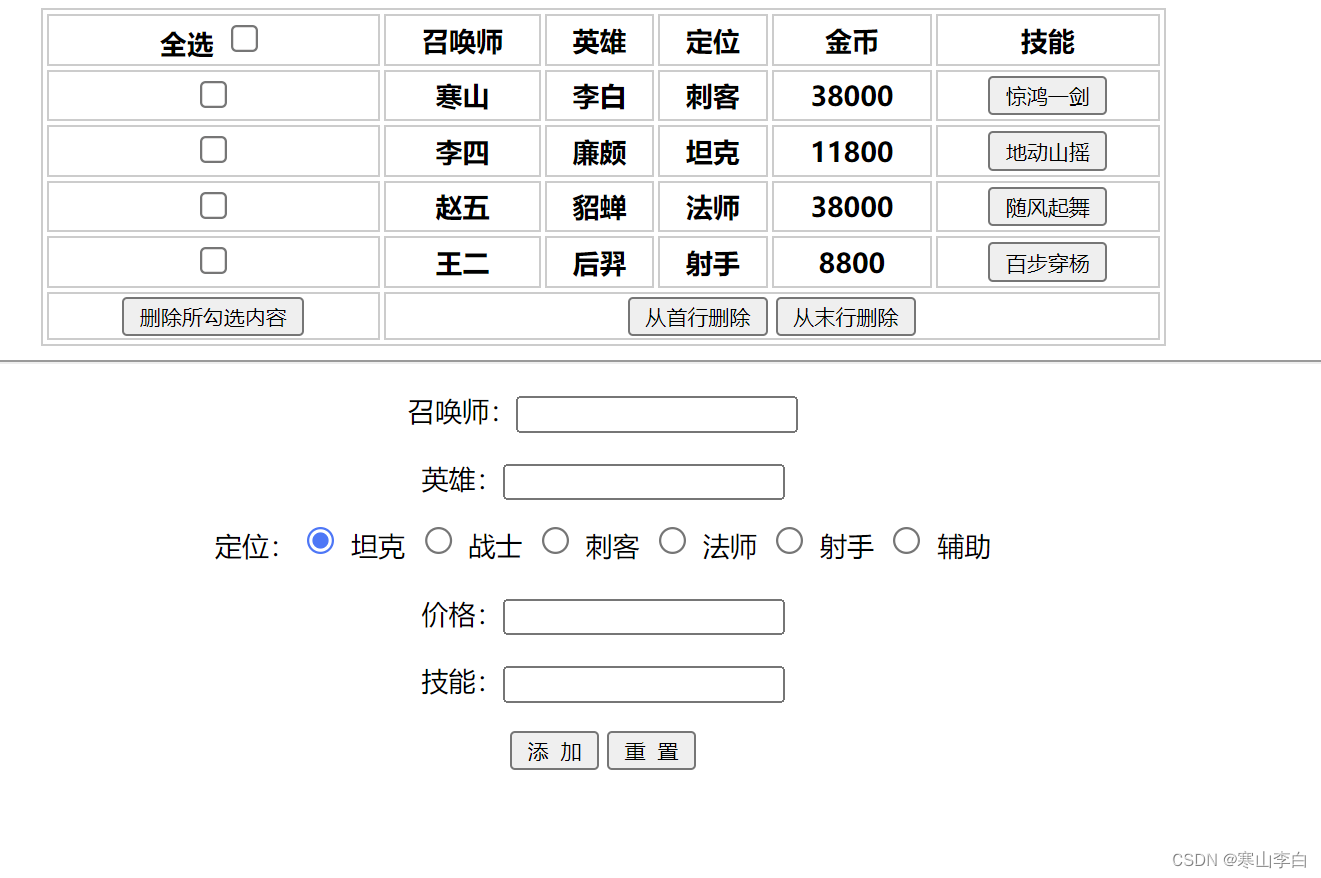
在每行最前面加上复选框按钮,最上面的按钮是全选按钮。
全选按钮选中后,下方所有复选框都自动勾选,反之亦然。
下方复选框全部勾选后,全选按钮的复选框自动勾选。
对新增的行也要满足。
在复选框那列最先放设置删除所勾选的内容按钮,可删除所有勾选的内容。
6.1 示例代码
示例代码如下
<!DOCTYPE html>
<html lang="en">
<head>
    <meta charset="UTF-8">
    <meta name="viewport" content="width=device-width, initial-scale=1.0">
    <title>使用dom操作表格-添加复选框并绑定事件</title>

    <style>
        /* 设置整个div块在页面中的位置 */
        #container{

            /* 居中 */
            text-align: center;
            /* background-color: lightblue; */
        }

        /* 设置table表格的样式 */
        #tt{

            /* 宽度 */
            width: 500px;
            /* 居中 */
            text-align: center;
            /* 边界设置 实线 灰色 */
            border: 1px solid #ccc;
            /* 边框设置 上下设为0 左右设为自动 */
            margin: 0 auto;
            /* 表格背景色 */
            /* background-color: lightblue; */
        }

        /* table下的td和th样式设置 */
        #tt td, #tt th{

            /* 边界设置 实线 灰色 */
            border: 1px solid #ccc;
        }

        /* table下的页脚的td样式设置 */
        #tt tfoot td{

            /* 靠右 */
            text-align: right;
        }

        /* 表单的样式设置 */
        #formId{

            /* 每行的间隔设置 */
            line-height: 30px;
        }

        /* 复选框删除按钮样式设置 */
        #tt tfoot tr td{

            text-align: center;
        }
    </style>

    <script>

        //页面加载完之后触发事件
        window.onload=function(){

            //为添加按钮绑定事件
            // document.getElementById("btnAdd")
            $("btnAdd").onclick=function(){

                //创建tr
                var tr = document.createElement("tr");

                //创建td
                var tdName = document.createElement("td");
                var tdHeroName = document.createElement("td");
                var tdActor = document.createElement("td");
                var tdPrice = document.createElement("td");
                var tdFun = document.createElement("td");
                //添加复选框
                var tdCheckbox = document.createElement("td");

                //将数据添加到td中
                tdName.innerHTML=$("name").value;
                tdHeroName.innerHTML=$("heroName").value;

                // tdActor.innerHTML=$("actor").value;
                //根据勾选的位置将对应的值填入定位一栏
                if($("tank").checked){

                    tdActor.innerHTML=$("tank").value;
                }
                if($("warrior").checked){

                    tdActor.innerHTML=$("warrior").value;
                }
                if($("assassin").checked){

                    tdActor.innerHTML=$("assassin").value;
                }
                if($("master").checked){

                    tdActor.innerHTML=$("master").value;
                }
                if($("shooter").checked){

                    tdActor.innerHTML=$("shooter").value;
                }
                if($("addjunct").checked){

                    tdActor.innerHTML=$("addjunct").value;
                }

                tdPrice.innerHTML=$("price").value;
                // tdFun.innerHTML=$("func").value;
                //创建按钮
                var btnFun = document.createElement("input");
                btnFun.type = "button";
                btnFun.value = $("func").value;
                //为按钮绑定事件用于删除
                btnFun.onclick = function(){

                    this.parentNode.parentNode.remove();
                }
                tdFun.appendChild(btnFun);

                //为复选框添加属性
                var checkboxInfo = document.createElement("input");
                checkboxInfo.type="checkbox";
                checkboxInfo.className="checkboxed";
                checkboxInfo.onclick=function(){

                    var checks = document.querySelectorAll(".checkboxed");
                    //统计已选中的数量
                    var count = 0;
                    for(var j=0; j<checks.length; j++){

                        if(checks[j].checked){

                            count++;
                        }
                    }
                    //判断是否全部选中
                    if(count==checks.length){

                        $("all").checked=true;
                    }else{

                        $("all").checked=false;
                    }
                };
                //将复选框的input标签添加到td中
                tdCheckbox.appendChild(checkboxInfo);

                //将td添加到tr中
                tr.appendChild(tdCheckbox);
                tr.appendChild(tdName);
                tr.appendChild(tdHeroName);
                tr.appendChild(tdActor);
                tr.appendChild(tdPrice);
                tr.appendChild(tdFun);

                //将tr添加到tbody中
                $("tb").appendChild(tr);
            };

            //为技能按钮绑定事件(删除,点击技能释放大招,删除当前行)
            var btFuns = document.querySelectorAll(".del");
            //遍历所有按钮,移出当前行,即tr
            for(var i=0;i<btFuns.length;i++){

                btFuns[i].onclick=function(){

                    //当前获取的位置是input标签,其父标签的父标签为tr标签
                    this.parentNode.parentNode.remove();
                }
            }

            //为首行删除按钮绑定事件
            $("btnDelFirst").onclick=function(){

                //通过获取tb的document对象,然后通过标签tr获取集合,删除第一个tr
                $("tb").getElementsByTagName("tr")[0].remove();
            };
            //为末行删除按钮绑定事件
            $("btnDelLast").onclick=function(){

                //获取tb下的tr集合
                var trs = $("tb").getElementsByTagName("tr");
                //移出最后一个tr
                trs[trs.length-1].remove();;
            };

            // 为全选绑定事件
            $("all").onclick=function(){

                //如果全选框勾上,触发事件所有复选框全部选中
                if($("all").checked){

                    var checkeds = document.querySelectorAll(".checkboxed");
                    for(var i=0; i<checkeds.length; i++){

                        checkeds[i].checked=true;
                    }
                }else{

                    var checkeds = document.querySelectorAll(".checkboxed");
                    for(var i=0; i<checkeds.length; i++){

                        checkeds[i].checked=false;
                    }
                }
            };

            //实现选中所有复选框时,全选自动勾选
            var checks = document.querySelectorAll(".checkboxed");
            for(var i=0; i<checks.length; i++){

                checks[i].onclick=function(){

                    var checks = document.querySelectorAll(".checkboxed");
                    //统计已选中的数量
                    var count = 0;
                    for(var j=0; j<checks.length; j++){

                        if(checks[j].checked){

                            count++;
                        }
                    }
                    //判断是否全部选中
                    if(count==checks.length){

                        $("all").checked=true;
                    }else{

                        $("all").checked=false;
                    }
                };
            }

            //为删除所勾选内容的按钮绑定事件
            $("delChecked").onclick=function(){

                var checks = document.querySelectorAll(".checkboxed");
                for(var i=0; i<checks.length; i++){

                    if(checks[i].checked){

                        checks[i].parentNode.parentNode.remove();
                    }
                }
            }


        };

        //获取元素的函数
        function $(id){

            return document.getElementById(id);
        }

    </script>

</head>
<body>

    <div id="container">
        <!-- 表格 -->
        <table id="tt">

            <!-- 表头 -->
            <thead>
                <tr>
                    <th>
                        全选 <input type="checkbox" id="all">
                    </th>
                    <th>召唤师</th>
                    <th>英雄</th>
                    <th>定位</th>
                    <th>金币</th>
                    <th>技能</th>
                </tr>
            </thead>

            <!-- 表格体 -->
            <tbody id="tb">
                <tr>
                    <th><input type="checkbox" class="checkboxed"></th>
                    <th>寒山</th>
                    <th>李白</th>
                    <th>刺客</th>
                    <th>38000</th>
                    <th><input type="button" value="惊鸿一剑" class="del"></th>
                </tr>
                <tr>
                    <th><input type="checkbox" class="checkboxed"></th>
                    <th>李四</th>
                    <th>廉颇</th>
                    <th>坦克</th>
                    <th>11800</th>
                    <th><input type="button" value="地动山摇" class="del"></th>
                </tr>
                <tr>
                    <th><input type="checkbox" class="checkboxed"></th>
                    <th>赵五</th>
                    <th>貂蝉</th>
                    <th>法师</th>
                    <th>38000</th>
                    <th><input type="button" value="随风起舞" class="del"></th>
                </tr>
                <tr>
                    <th><input type="checkbox" class="checkboxed"></th>
                    <th>王二</th>
                    <th>后羿</th>
                    <th>射手</th>
                    <th>8800</th>
                    <th><input type="button" value="百步穿杨" class="del"></th>
                </tr>
            </tbody>

            <!-- 表格页脚 -->
            <tfoot>
                <tr>
                    <td>
                        <input type="button" value="删除所勾选内容" id="delChecked">
                    </td>
                    <td colspan="5">
                        <input type="button" value="从首行删除" id="btnDelFirst">
                        <input type="button" value="从末行删除" id="btnDelLast">
                    </td>
                </tr>
            </tfoot>
        </table>

        <hr>

        <!-- form表单创建 -->
        <form action="" id="formId">
            召唤师:<input type="text" id="name"><br>
            英雄:<input type="text" id="heroName"><br>
            定位:<input type="radio" name="actor" value="tank" id="tank" checked> 坦克
                  <input type="radio" name="actor" value="warrior" id="warrior"> 战士
                  <input type="radio" name="actor" value="assassin" id="assassin"> 刺客
                  <input type="radio" name="actor" value="master" id="master"> 法师
                  <input type="radio" name="actor" value="shooter" id="shooter"> 射手
                  <input type="radio" name="actor" value="addjunct" id="addjunct"> 辅助<br>
            价格:<input type="text" id="price"><br>
            技能:<input type="text" id="func"><br>
                  <input type="button" value="添  加" id="btnAdd">
                  <input type="button" value="重  置">
        </form>
    </div>

</body>
</html>
6.2 页面效果
使用浏览器打开页面,如下
7. 示例代码下载
本文示例代码文件已上传至CSDN资源库
下载地址:JavaScript 趣味案例-事件处理-dom操作表格 示例代码
感谢阅读,祝君暴富!
原文链接: https://hanshan.blog.csdn.net//article/details/139994097